Planning to set sail soon? If you’re wondering whether you can use your phone’s data on a cruise, the short answer is yes—but there’s more to it than just flipping on cellular data. Understanding how phone data works and the best strategies for using it at sea can save you from sky-high bills and connectivity headaches. Here, we’ll explain everything you need to know, including tips to stay connected, pros and cons of data options, and how to avoid overages.
What is "Data" on a Cellular Device?
Cellular data is the information your smartphone sends and receives over your mobile carrier’s network when you’re not connected to WiFi. This allows you to access the internet, stream media, and use apps wherever there’s cellular service. Essentially, cellular data bridges the gap when you’re away from home or can’t rely on traditional WiFi networks like Carnival Cruise WiFi or Norwegian Cruise WiFi.
The amount of data you use depends on your activity—watching a high-definition video will consume more data than sending a quick email. Most smartphones track your usage so you can monitor how much data you’ve used at any time.
How Do People Use Data on Their Devices?
Smartphones are essential travel companions, and data usage tends to ramp up on a trip. Here are some common ways people use cellular data on their devices:
Social Media: Posting photos and videos, livestreaming, or scrolling through feeds.
Streaming: Watching Netflix, Disney+, YouTube, or listening to Spotify during downtime.
Navigation: Using GPS and apps like Google Maps to find attractions, restaurants, and more.
Email and Messaging: Staying in touch with work or loved ones through email, WhatsApp, or iMessage.
Web Browsing: Researching excursions, weather updates, and other travel-related needs.
While these tasks seem straightforward, they can add up quickly, especially when you’re not on cruise WiFi.
Pros & Cons of Using Cellular Data from Your Home Carrier on a Cruise
When you first board that ship, the Royal Caribbean cruise WiFi connection might sound like your best option. But opting to stick with your own cellular plan could be tempting. However, it’s crucial to weigh both the benefits and drawbacks.
Pros:
Convenience: Keeping your existing phone and plan is hassle-free—no need to hunt for alternatives.
Automatic Coverage: Your carrier may automatically connect to available networks when docked at ports.
Cons:
High Roaming Fees: Most carriers charge exorbitant rates for data roaming on satellite connections at sea. Expect $10 to $15 per MB in some cases. This can lead to a bill worth hundreds of dollars when you return home.
Limited Service at Sea: Once you’re beyond a certain distance from shore, cellular towers won’t reach, and you might need to rely on your cruise’s satellite-based WiFi, such as Princess Cruise WiFi or MSC Cruise WiFi.
Pros & Cons of Using a GigSky Cruise + Land eSIM on a Cruise
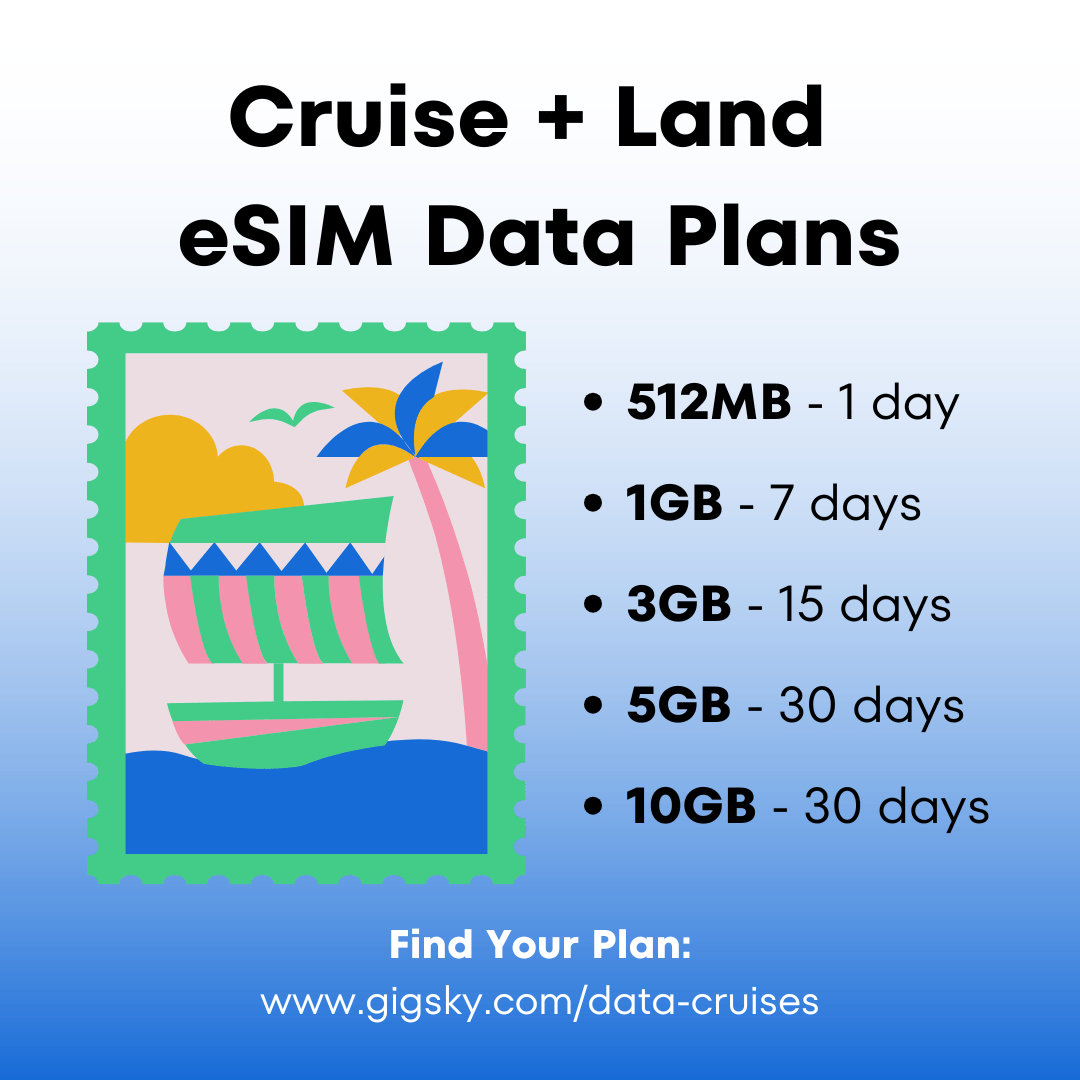
An increasingly popular solution for cruisers is switching to a global eSIM, like GigSky’s Cruise + Land option. With an eSIM, your phone can access international data plans without physically changing SIM cards.
Pros:
Cost-Effective: eSIM plans, like in the GigSky app, are dramatically cheaper than paying roaming fees through your home carrier.
Easy Setup: Download and activate directly to your smartphone—no need for additional hardware.
Global Coverage: GigSky’s Cruise + Land plans include coverage both at sea and onshore.
Flexible: Find a variety of plans for regions across the world and on over 200 cruise ships.
No Hidden Fees: When you purchase a travel eSIM, you only pay for the data you need. No hidden fees ever!
Easy Top Ups: Need more data? Top up – even if you’ve run out of data – in minutes!
Cons:
Fixed Data Plans: Excessive use could leave you without coverage midway into your trip.
Requires eSIM compatibility: Devices must be eSIM-compatible in order to use GigSky’s services.
Tips for Saving Data & Avoiding High Fees
Regardless of your data plan, managing your usage is key to avoiding costly fees or running out of data during your trip. Here are some practical tips to ensure smooth sailing:
1. Turn Off Background App Refresh
Apps like email, social media, and cloud storage constantly update in the background, consuming data. Disable this feature in your device’s settings.
2. Use Offline Maps
Plan ahead by downloading maps for your destination via Google Maps or other navigation apps before boarding. They’ll work without an internet connection.
3. Connect to Cruise WiFi Judiciously
If you choose to use Celebrity Cruise WiFi or Disney Cruise WiFi, purchase smaller packages designed for messaging or browsing rather than full-blown video-streaming plans.
4. Monitor Your Data Usage
Both eSIMs and most carriers provide tools to track your data consumption, so keep an eye on it daily. Set usage alerts to avoid surprises.
5. Optimize Streaming Settings
When streaming video or music, lower quality settings to reduce data consumption. For apps like Netflix, download episodes or movies before you leave and watch them offline.
6. Enable Airplane Mode When Unnecessary
To avoid accidental fees, turn on airplane mode while at sea and only connect to WiFi when truly needed.
Conclusion
While using your phone’s data on a cruise is entirely possible, it requires some careful planning. Whether using your home carrier or opting for a GigSky Cruise + Land eSIM, understanding the costs, limitations, and practical data-saving strategies can help you avoid surprises. Remember, always explore your cruise’s WiFi options—like NCL cruise WiFi—for contingency needs.
Now you’re all set to stay connected while cruising the high seas! Bon voyage!
.png)





.jpg)


%20(1)%201%20(1).webp)


.svg)
.svg)
%20(1).jpg)