




Princess Cruises 2026 Internet Options: (eSIM, WiFi & Roaming)
Compare three ways to get internet on Princess Cruises in 2026: GigSky Cruise + Land eSIM, MedallionNet WiFi, and carrier roaming. Prices and setup inside.
 by Alexis Miller
Three options cover almost everyone sailing with Princess cruises 2026: a GigSky Cruise + Land eSIM, Princess cruise WiFi through MedallionNet, and roaming with your home carrier.
Each one connects you on board and, in most cases, at your port stops, and each has its own price, setup, and best-fit traveler.
This guide walks through all three so you can match one to how you actually use your phone at sea. If you're comparing Princess cruises internet packages for a Princess cruise 2026 sailing, the differences below are what actually matter.
Here's the quick version before the details.
Option 1: GigSky Cruise + Land eSIM
The GigSky Cruise + Land eSIM is a data plan that works both onboard Princess ships and when you're docked at port destinations, all on one plan.
You need an eSIM-compatible, unlocked smartphone. Plans are regional, so a single purchase covers the ship plus every port in that region, with no separate plan per stop.

Features
- Affordable rates: Plans start at $7.
- On and off ship: One plan covers sea days and port days.
- User-friendly setup: No physical SIM. You activate through the GigSky app.
- Data-use monitoring: The app tracks your real-time usage, and you get a notification at 80%.
- No hidden fees: You pay for the data you choose, with no data roaming surprises.
How do you connect using GigSky?
Set it up with these steps.
- Confirm your phone supports eSIM and is unlocked. This takes a few minutes.
- Download the GigSky app from your app store or Play Store.
- Tap Cruises.
- Choose your cruise line, then your ship, then the region you're sailing.
- Pick a Standard plan or Essentials plan.
Standard plans give you an amount of data to use however you want during your trip, from 512MB to 10GB, for browsing, apps, and email, starting at $16.99 USD.
Essentials plans cover the apps you lean on while cruising, like WhatsApp, Instagram DMs, Facebook Messenger, and maps at port, for 1 to 14 days, starting at $7 USD.
One timing note that saves a lot of first-time cruisers: install the eSIM a few hours before departure, but keep it turned off until you board, then turn it on.
Because it auto-connects to the best local network, activating too early can use data while you're still on land. Full connectivity begins about an hour after the ship leaves port.
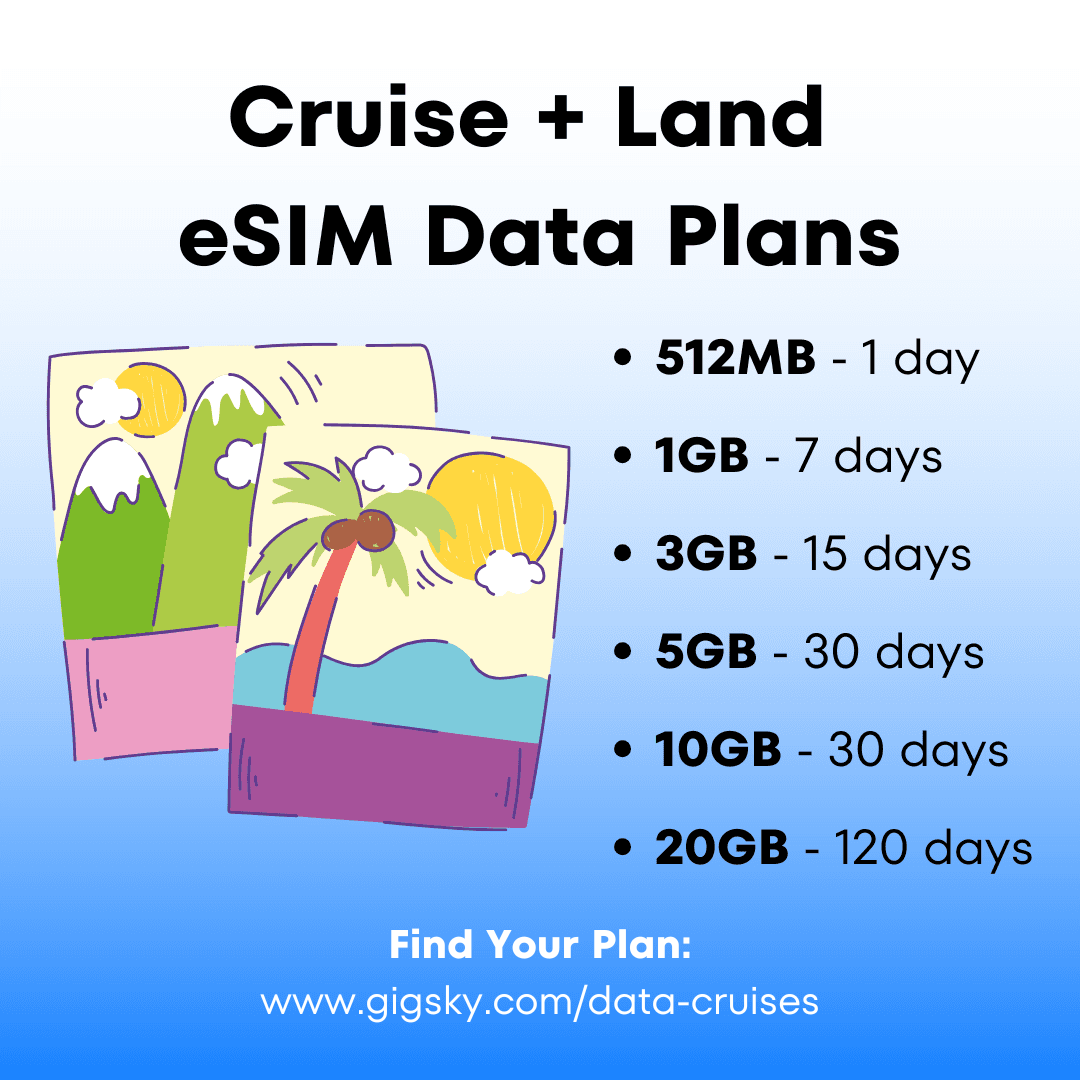
You track every megabyte in the app, and pricing stays transparent.
Eligible Visa cards get 20–30% off on cruise eSIMs with the GigSky app.
Best for
Frequent travelers and budget-minded cruisers who want one plan for the whole trip, especially if you'll explore ports and want data off the ship too.
It's built for light-to-medium personal use like messaging, social, maps, and check-ins, so if you plan to stream, download your shows before you sail.
Option 2: Princess cruises WiFi package
Princess cruise WiFi runs through MedallionNet® and MedallionNet Max®, often described as the "best WiFi at sea." Among the Princess cruises internet packages available, it's a good fit if you want consistent connectivity throughout the ship.
Princess typically packages WiFi with amenities like drinks and dining, so the cost of wifi on princess cruises depends on whether you buy it on its own or as part of a bundle.
Plan options and pricing
There are two ways to stay connected on Princess cruises: the Princess app, which gives you free WiFi onboard, and the paid Princess Plus and Princess Premier packages. Each Princess cruises WiFi package bundles connectivity with other amenities rather than selling it alone.
Free WiFi: The Princess app works on the ship's WiFi at no charge. You can view your daily schedule and itinerary, message other passengers in the app, message your room attendant and customer service, and track travel companions via their Medallion (works, though it can lag when people are moving). You can message other passengers, but not people back home.
iMessage (text only, no images) usually works free on iPhone because of how Princess routes app notifications, though this varies by ship, reported working on Sapphire but not Diamond or Star (2026).
Ordering food or room service in the app is free, but there's a one-time $15/person "Ocean Now" charge per cruise if you don't have a package.
Turn off cellular at sea: The ship runs a satellite service ("Cellular at Sea") that shows as your carrier, and calls or data on its bill to your phone at about $3/min. Use airplane mode, a cruise eSIM, or ship WiFi.
In port, your regular service often works within about 5 miles of shore, but check roaming fees for each destination, or use an eSIM that works on sea days and port days without triggering roaming charges.
Packages and discounts: WiFi is bundled into the Plus and Premier packages. Do the math, since packages mainly pay off if you'll use casual or specialty dining and drink two or more alcoholic drinks a day.
If not, WiFi-only or an eSIM may fit your budget better. Captain's Circle Elite status gives about 50% off internet.
How do you get connected on MedallionNet?
- Open the MedallionClass app on your smartphone once onboard.
- Follow the prompts to purchase a WiFi package.
- Complete the payment.
- Connect your device to the MedallionNet WiFi network.
- Log in with the credentials from sign-up.
Best for
Travelers who rely on connectivity for work, and who are already leaning toward a Plus or Premier package. It's the Princess cruises WiFi package choice for people who plan to stay onboard most of the trip.
Option 3: Roaming with your home carrier
Roaming keeps your phone on your home network using satellite coverage while at sea, with no new apps or hardware.
You'll usually pay per megabyte or gigabyte based on your carrier's roaming agreement, and most major carriers offer roaming wherever Princess ships sail.
Features
- Seamless setup: Your phone stays on your home network, nothing to install.
- Usage-based billing: You pay per MB or GB depending on your carrier and whether you're calling, texting, or using data.
- Global reach: Most major carriers cover Princess routes.
Estimated pricing
Rates vary, but many carriers charge $2 to $6 per megabyte at sea or when roaming internationally. Some offer packages, such as $100 for a few hundred megabytes. Check with your carrier before you sail.
Best for
Travelers who rarely use data but want it as a backup, for occasional texts, calls or emails.
How do you choose the best option?
Match the option to your usage. Weighing the Princess cruises internet packages side by side is easiest when you start from how much data you actually use. Here's how the three line up.
Budget: GigSky offers per-day pricing lower than other options. Roaming can add up for heavy data use, so it suits occasional use.
Usage needs: For streaming or large uploads, cruise ship WiFi premium plans or GigSky's higher-data packages fit best. For email and social updates, both can work depending on how the pricing sits with you.
Travel style: GigSky suits travelers who explore ports and want flexibility on one plan for a Princess cruise 2026, while Princess WiFi suits those staying onboard most of the trip and roaming suits those who want a light backup.
For Princess cruises 2026 sailings specifically, GigSky is the one option that keeps you on the same plan from your first sea day through every port.
Tips for staying connected on your cruise
- Pre-book your WiFi plan. Princess offers up to 50% off for Platinum and Elite guests, and other discounts may apply to all guests though this isn't specified on the website. GigSky runs regular sales and rewards for returning customers.
- Track usage. Monitor your data on pay-as-you-go plans like roaming, so you don't come home to a large bill. (It helps to know what data roaming is before you sail.)
- Limit usage during peak times. Cruise ship WiFi slows when demand is high, such as evenings, and some lines throttle data to serve everyone.
FAQ
What's the cheapest way to get internet on a Princess cruise?
The GigSky Cruise + Land eSIM starts with a free 100MB trial and then from $7. It covers sea days and port days on one plan. Try GigSky Free.
Do the GigSky and Princess plans work in port as well as at sea?
Yes. The GigSky Cruise + Land eSIM works both onboard and at port stops on a single regional plan. Princess MedallionNet works onboard, and in port your regular carrier often connects within about 5 miles of shore, subject to roaming fees.
How Much Does Princess Cruises Internet Cost in 2026?
Princess bundles WiFi into its Plus and Premier packages, so cost depends on the bundle: Plus runs $65 per person/day pre-cruise and Premier $100 per person/day pre-cruise. Elite guests get about 50% off internet. When you're weighing Princess cruise 2026 connectivity, compare that against a cruise eSIM or WiFi-only option.
Can I avoid roaming charges on a Princess ship?
Yes. Turn your phone line off to avoid "Cellular at Sea" satellite billing, then connect through ship WiFi or a cruise eSIM that covers both sea and port without triggering roaming. Comparing the cost of wifi on princess cruises against an eSIM plan is the fastest way to see which is cheaper for your trip.
Final thoughts
You've got three clear ways to stay connected on a Princess cruise 2026: a GigSky Cruise + Land eSIM, cruise WiFi through MedallionNet, or your carrier's roaming.
Pick the one that matches how you actually use your phone at sea, plan ahead, and you're set. Whichever of the Princess cruises 2026 options you choose, GigSky lands first in most Princess cruises 2026 connectivity comparisons because a single plan carries you from sea day to port.
To test connectivity before you commit, download the GigSky app and activate the free 100MB trial, then top up if you need more.
%2520(20).jpg&w=3840&q=75)
%2520-%25202026-07-23T121143.484.jpg&w=3840&q=75)
%2520-%25202026-05-28T152752.930.jpg&w=3840&q=75)