



When Should You Buy eSIM Data for International Travel? (Avoid Airport Hassles)
Buy your travel eSIM whenever the price is right, then install it the day before you fly so every paid day lands on your trip.
 by Amira Bula
Nobody wants to pay for days they won’t use, and that worry is why so many travelers put off the decision to buy eSIM data. The timing is easier than it sounds.
Buy your plan whenever you like, install it the day before you fly or the morning you leave, and your plan starts when your eSIM first connects to a network in a country it covers. For most trips, that means after you land.
Read on to learn more details about when to buy and activate your eSIM so you don't waste any days of your plan.
What’s the best time to buy a travel eSIM?
Buy your eSIM early if the price is right, install it the day before you fly or the morning you leave, and switch the eSIM on when you land. The table shows the full sequence.
| When | What to do | Why |
|---|---|---|
| Today | Check that your phone supports eSIM and is unlocked | It takes a few minutes and avoids paying for a plan your phone can’t use |
| Any time before your trip | Buy your plan | GigSky plans can be installed up to 1 year after purchase |
| The day before you fly, or that morning | Install the eSIM on home Wi-Fi | You have a strong connection, and the plan doesn’t start until it connects in a covered country |
| Before you land | Turn off your home line | Avoids roaming charges on your home number |
| After you land | Turn the eSIM on if you switched it off | GigSky connects to the best local network on its own |
How to buy e SIM plans without paying for idle days?
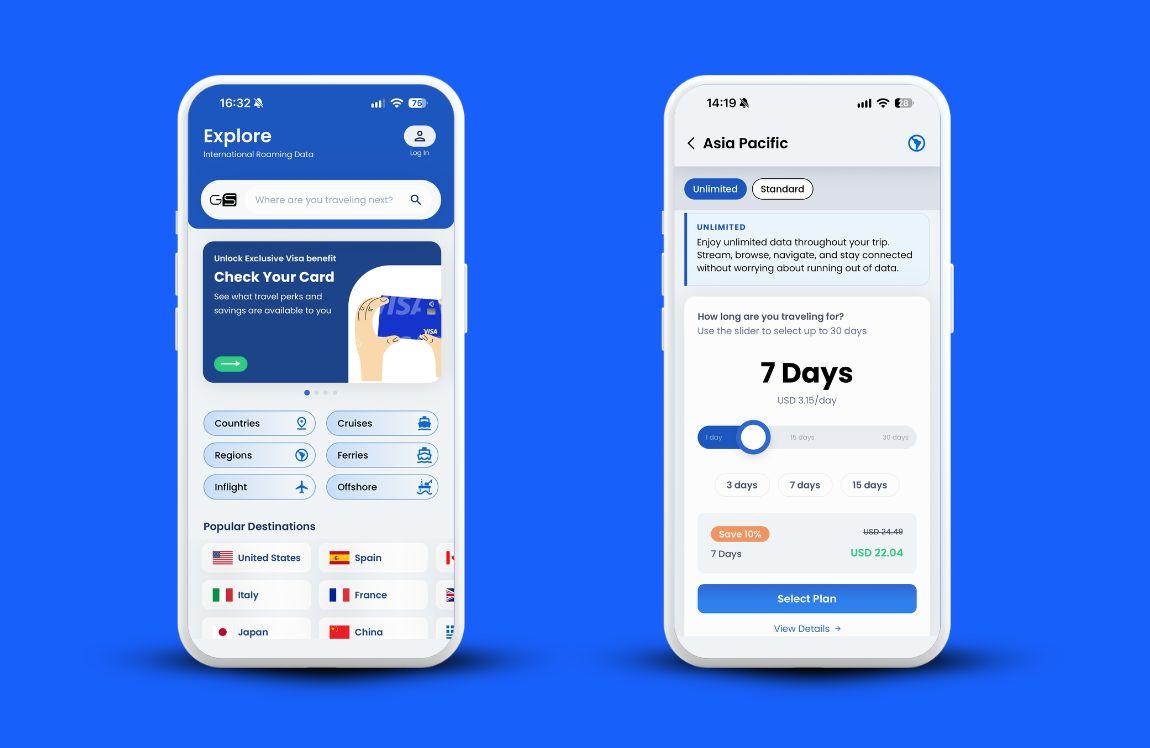
Buying early costs nothing as long as you wait to install. Buying a month ahead or the night before gets you the same plan, so choose the moment the price suits you.
Most people buy the day before departure, and that works fine. Some providers run discounts, though, and if one shows up while your trip is still months away, you can buy eSIM data early and install it later.
GigSky eSIM plans can be installed any time within 1 year of purchase, so nothing runs down while the plan waits. With other providers, check the validity period before you commit, because the window changes from one to the next.
Buying and installing are two separate moments, and the gap between them is what protects you from idle days.
Buying reserves the plan. Installing puts it on your phone. Every plan also comes with a validity period, like 7 days for a 1 GB plan, and once the plan starts, those 7 days run whether you use data or not.
What should you check on your phone before you order?
Two quick checks matter here: your phone has to support eSIM, and it has to be unlocked. Most recent phones pass both, and each check takes a few minutes.
Anyone working out how to order esim plans for the first time should start here, before opening a checkout page.
- Open your phone’s keypad.
- Dial *#06#.
- Look for an EID number on the screen. If one appears, your phone supports eSIM.
- If you have an iPhone, open Settings, then tap General, then About.
- Scroll down to Carrier Lock.
- Confirm it says “No SIM restrictions.”
If it says anything else, your carrier needs to unlock the phone first.
On Android, our guide to checking whether your phone is unlocked walks through the steps, and the GigSky compatibility page is the quickest place to confirm your model.
Does eSIM activation start when you buy, install, or land?
Your plan starts the first time your eSIM connects to a network in a destination it covers. Buying doesn’t start it, and neither does installing, unless you’re standing in a covered country when you do.
Take someone in the U.S. with a Europe plan. Install it at home and nothing counts down until the phone connects in Europe.
Now flip it. An Americas/Caribbean cruise eSIM also covers the U.S., so installing it while you’re still in the U.S. starts the plan right away, because you’re already in a covered country.
That’s why the coverage list matters. In the GigSky app, tap the plan you’re thinking about, then View Details, and every covered country appears.
For a plan you already own, tap My Plans, then View Details to see the countries or cruise lines it covers.
With GigSky, eSIM activation happens on its own. Your phone connects to the best local network when you land, with no settings to change.
GigSky is a mobile operator that partners directly with local networks worldwide, which is how it picks the strongest one for you.
Some providers ask you to open their app and start the plan by hand after landing, so check how it works before you pay.
Should you install your eSIM before you fly or after you land?
Before. Install it the day before your flight or the morning you leave, while you still have a strong connection at home.
Installing after you land means needing a connection to get a connection. There’s no data on the plane, so you’d step off, walk to the terminal and look for airport Wi-Fi before you could tell anyone you’d arrived.
Activating eSIM data from the arrivals hall works if you find a network, but it’s a poor use of your first hour abroad.
Install at home and the sequence runs the other way. You land, your phone connects to the best local network, and maps and your rideshare app work as you walk out.
You skip the kiosk line and the SIM swap, and your home SIM stays in your phone.
Here’s the routine for install day:
- Connect to your home Wi-Fi.
- Install your GigSky eSIM, following the step-by-step install guide.
- Switch the eSIM off in Settings, then Cellular, if your plan covers the country you’re in.
- Turn off your home line in Settings, then Cellular, under SIMs, before you land.
- Turn the eSIM back on after you land, if you switched it off.
Step 3 keeps data from starting early, and step 4 keeps roaming rates off your home number. If you never switched the eSIM off, there’s nothing to do after landing. You just have data.
What if your flight is delayed or your dates change?
A one or two day delay barely touches your plan, and a bigger date change costs nothing if you haven’t installed yet.
A late flight shifts your arrival by a day or two at most. If the whole trip shifts by a month, the eSIM waits in your account and you install it on the new schedule.
This is the quiet reason to install late. A 1 GB plan with 7 days of validity, installed two weeks early and left on in a covered country, can expire before you board.
Cruising soon? How to buy e SIM data and time your install
For a cruise, install a few hours before departure instead of the day before. The cruise eSIM connects to the best local network on its own, so an early install on land can start using data before you board.
Keep it switched off until you’re on the ship, then turn it on. Full connectivity begins about 1 hour after the ship leaves port.
GigSky is the only eSIM provider that works aboard 290+ cruise ships, and one regional plan covers sea days and every port on your route, so you don’t need a new plan at each stop.
To buy eSIM data for the voyage, download the GigSky app, search for your cruise line, and choose the region you’re cruising to.
Not sure the eSIM will work on your phone? Activate the free 100MB trial from the same cruise line page first, and you’ll get a notification when you’ve used 80% of it.
Can you try an eSIM free before you commit?
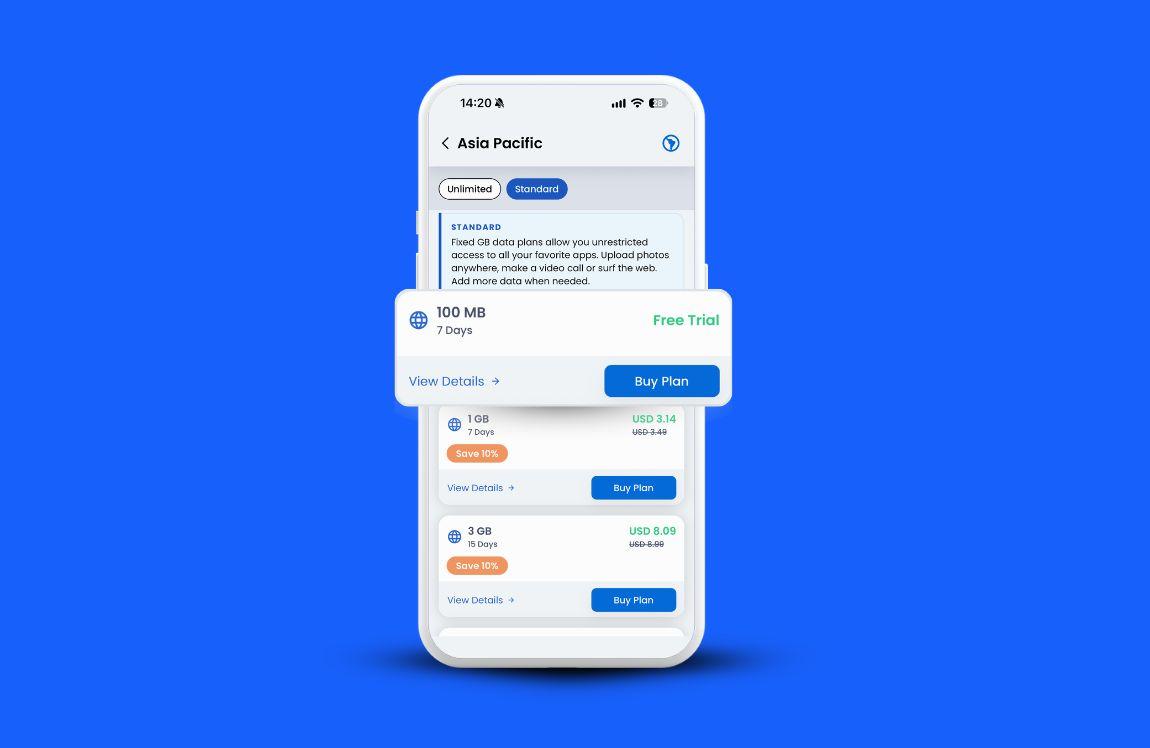
Yes. GigSky gives 100MB to 500MB of free data without adding a card, and eligible Visa cardholders can get more.
The free eSIM works like a paid one, which is the point. Install it first, use it for the first day or two to confirm everything connects, then top up or move to a paid plan once you’re happy.
Search your destination or cruise line in the GigSky app to see whether free data is available there.
The 500MB option is for certain regions only. It’s also the cheapest way to find out whether your phone and your destination get along before you buy eSIM data you’re unsure about. Not every provider lets you test first, so check before you pay anywhere.
Eligible Visa cardholders get more. Those in the Americas can get up to 10GB free, and those anywhere in the world can get up to 7 days of free unlimited data in Visa Destinations, which launched with the UK, France, the UAE, Thailand and the U.S., with more being added.
The amount and length depend on your card tier and destination, plus you get 20% or 30% off any extra plans. To check, tap the Visa banner in the GigSky app. Verifying your card doesn’t charge you.
How do you pick one eSIM for a trip with several stops?
Look at the whole route first, then choose a regional or multi-country plan instead of one plan per country.
It’s easy to buy for the first stop and forget the rest. Count the layovers and border day trips, and any cruise or ferry on the route.
Country plans cover a single country. Regional plans cover an area like Europe, Latin America or Asia, and one regional eSIM usually costs less than a separate eSIM for each country.
Knowing how to buy e SIM plans for a multi-stop trip mostly comes down to reading the coverage list before you pay.
With GigSky you install it once and the same eSIM works across 200+ destinations, so it’s ready for your next trip too.
What else keeps the cost down?
Promo codes, and a close look at your data in the first two days.
Sales and referral credits turn up often, especially around Black Friday and in summer, so look for a code before you buy eSIM data.
A 10 to 30% code can change which provider is cheapest for your trip. Once you’re connected, check your usage in the app for the first 24 to 48 hours.
A runaway app or background sync is easy to catch early and annoying to catch late. After a trip or two you’ll know how many gigabytes you really use, which makes the next plan easier to pick.
If watching the numbers isn’t your style, an unlimited plan takes that off your mind.
FAQs about buying and installing a travel eSIM
What if I land and my eSIM doesn’t connect?
Installing before you fly means any problem shows up while you still have Wi-Fi to fix it. If eSIM activation seems stuck after you land, restart your phone first, since that’s the fastest fix. This guide to five other fixes covers the rest.
Can I still install my eSIM at the airport if I forgot?
Yes, but you’ll need Wi-Fi to do it. Free airport Wi-Fi is open to everyone, so keep sensitive logins for later. Installing at home is easier and more private.
Will my carrier charge me roaming fees anyway?
Roaming rates apply when your home line stays on abroad. Open Settings, then Cellular, find your number under SIMs, and turn the line off. If you still need texts on that number, you can leave it on, but check your carrier’s rates for your destination first because they change by country. Many apps can send verification codes by email instead of text.
What if I’m not tech-savvy and mess up the installation?
You don’t need to be tech-savvy. GigSky has step-by-step install guides for iPhone and Android, and if you’re still working out how to order esim plans, the free trial lets you run through the install before you pay for anything.
What if my travel plans change?
If you haven’t installed the eSIM yet, you keep it and install on your new dates. GigSky plans can be installed up to 1 year after purchase, so a date change doesn’t cost you the plan.
What if I need help while I’m abroad?
Request support through the GigSky app, or visit the help center.
Recap: When to buy and activate your travel eSIM
The short version of how to buy e SIM plans without wasting a day:
- Buy whenever the price suits you. GigSky plans can be installed up to 1 year later.
- Install the day before you fly or the morning you leave, on home Wi-Fi.
- Your plan starts when the eSIM first connects in a country it covers, so read View Details before you pay.
- Turn off your home line before you land, and turn the eSIM on after landing if you switched it off.
- Cruising? Install a few hours before departure and keep the eSIM off until you board.
- Try the free eSIM or an eligible Visa benefit before paying for more data.
Next step: open the GigSky app, search your destination or cruise line, and see whether free data is waiting for your trip.