

%2520-%25202026-06-26T130706.457.jpg&w=3840&q=75)


GigSky eSIM Not Working? 5 Fixes and How to Get Connected
Your eSIM has a signal but no data? Learn the 5 fixes that solve most issues and the free hack that tells you if your provider is the problem.
 by Unknown Author
If your eSIM is not working, the cause is usually a faulty install, a carrier-locked phone, a device that doesn’t support eSIM, or a weak local network.
Restart your phone first, then confirm Cellular Data, Data Roaming and your eSIM are on.
Quick check: Is your phone ready for an eSIM?
Before troubleshooting the connection, confirm your phone is eSIM compatible and isn't tied to a carrier. Here's what to verify and where.
| Check | What you need | Where to look |
|---|---|---|
| eSIM support | An EID number present | iPhone: Settings > General > About. Android: gigsky.com/device-compatibility |
| Carrier lock | "No SIM restrictions" | iPhone: Settings > General > About > Carrier Lock |
| Active data line | eSIM set to ON for data | Settings > Cellular > SIMs |
| Network coverage | Provider routes a strong local carrier | esimdb.com (search your provider) |
Why is my eSIM not working?
An eSIM usually fails for one of four reasons: a faulty install, a locked phone, a phone that doesn't support eSIM, or a weak local network.
Working out which one you're dealing with is most of the battle, so here's how to tell them apart.
A bad install is the most common. If your Wi-Fi was spotty when you set up the profile, or you moved through the steps quickly, it may not have downloaded fully. More common than people expect.
Then there's the locked phone. If you're still paying off your device on a carrier plan, there's a good chance it's locked to that carrier, and a locked phone can't connect through another provider's eSIM no matter how strong the signal. You'd need your carrier to unlock it.
Some phones don't support eSIM at all. Most released in the last few years do, but it's worth confirming before assuming the issue lies elsewhere.
The trickiest one is the provider. If your eSIM isn't pulling a strong local network in the country you're in, no error message tells you. Your bars might look fine while data refuses to load.
What's the fastest fix for a GigSky eSIM not working?
Restart your phone first. It forces the device to re-scan for available networks and clears a surprising share of eSIM not working issues on its own.
If a restart doesn't do it, check these settings manually:
- Turn Cellular Data ON.
- Turn Data Roaming ON.
- Set your APN to gigsky, all lowercase, no spaces, if you're on GigSky.
- Open Settings, then Cellular, then SIMs, and confirm your eSIM is ON and your physical SIM line is OFF for data.
- Step outside if you're in a basement, underground, or a remote spot, and try again in open air.
That last one trips up more people than you'd think. A dead zone looks identical to a broken eSIM from the inside.
Why is my iPhone eSIM not working?
An iPhone eSIM not working usually comes down to the wrong line being active for data or the phone being carrier-locked, both of which you can check in Settings. Start there before anything else.
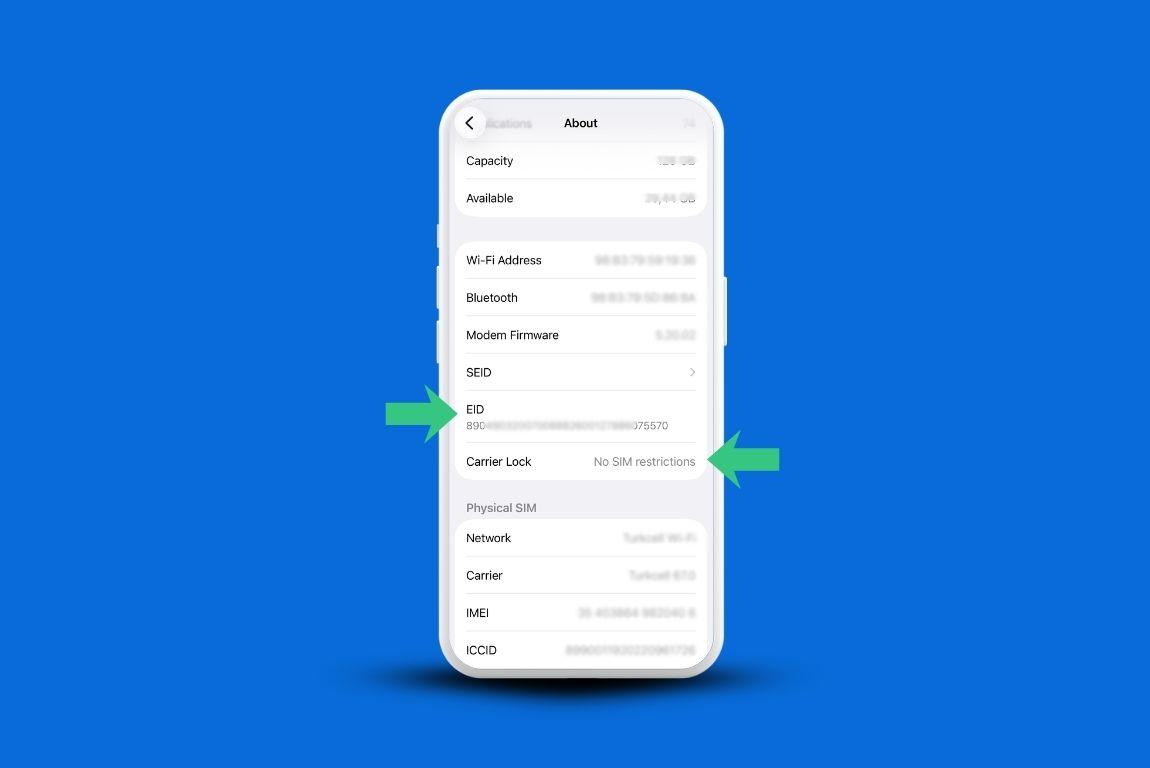
- Open Settings, then General, then About.
- Scroll down and look for an EID number, which confirms eSIM support.
- Check Carrier Lock. If it reads "No SIM restrictions," your iPhone is unlocked and free to use any provider.
- Open Settings, then Cellular, then SIMs, and make sure your eSIM is selected for cellular data.
\If your iPhone is locked, you'll need to contact your carrier to unlock it.
What if the problem is your provider?
If your phone is unlocked, compatible, and correctly set up but data still won't load, the issue is most likely your provider's local network connection. You can confirm this in about a minute.
Go to esimdb.com, type in your provider's name, and it'll show which local networks they route through.
If those networks aren't well-regarded in your area, that explains the silence on your screen.
The harder question is what to do about it, since switching providers mid-trip sounds disruptive and usually means paying twice.
How can I test a different eSIM without paying again?
You can test a different network for free with a GigSky trial, which tells you within minutes whether the problem was your phone or your old provider. If GigSky connects and your previous eSIM didn't, you have your answer.
GigSky is a mobile operator, so it connects directly to local networks rather than reselling through a third party.
When you travel, your device switches automatically to the strongest available carrier in that country, with nothing to check or select manually.
That's what makes it a clean test: a fundamentally different network setup, at no cost, before you commit to anything.
Here's how to get a free trial:
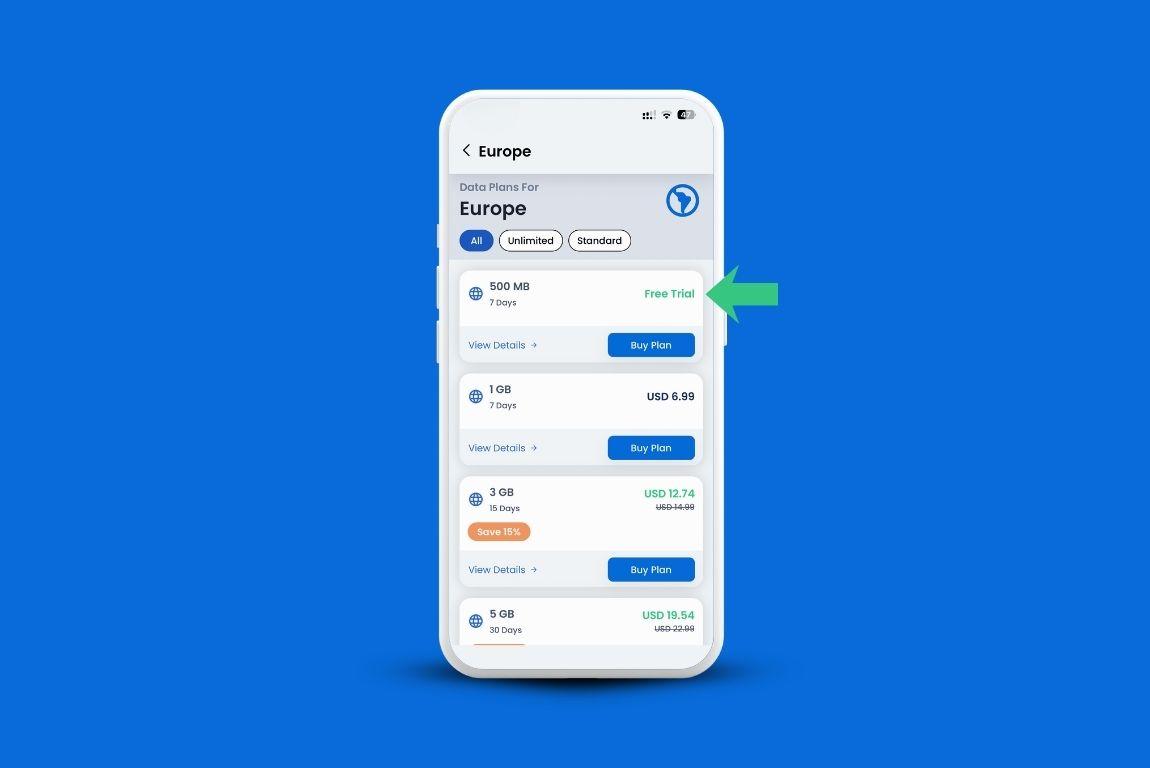
- Download the GigSky app.
- Type your destination into the search bar, whether that's a country, a cruise line, or a region like Europe.
- Redeem the free trial if one appears. No credit card needed.
If you have an eligible Visa card, the free amount goes higher:
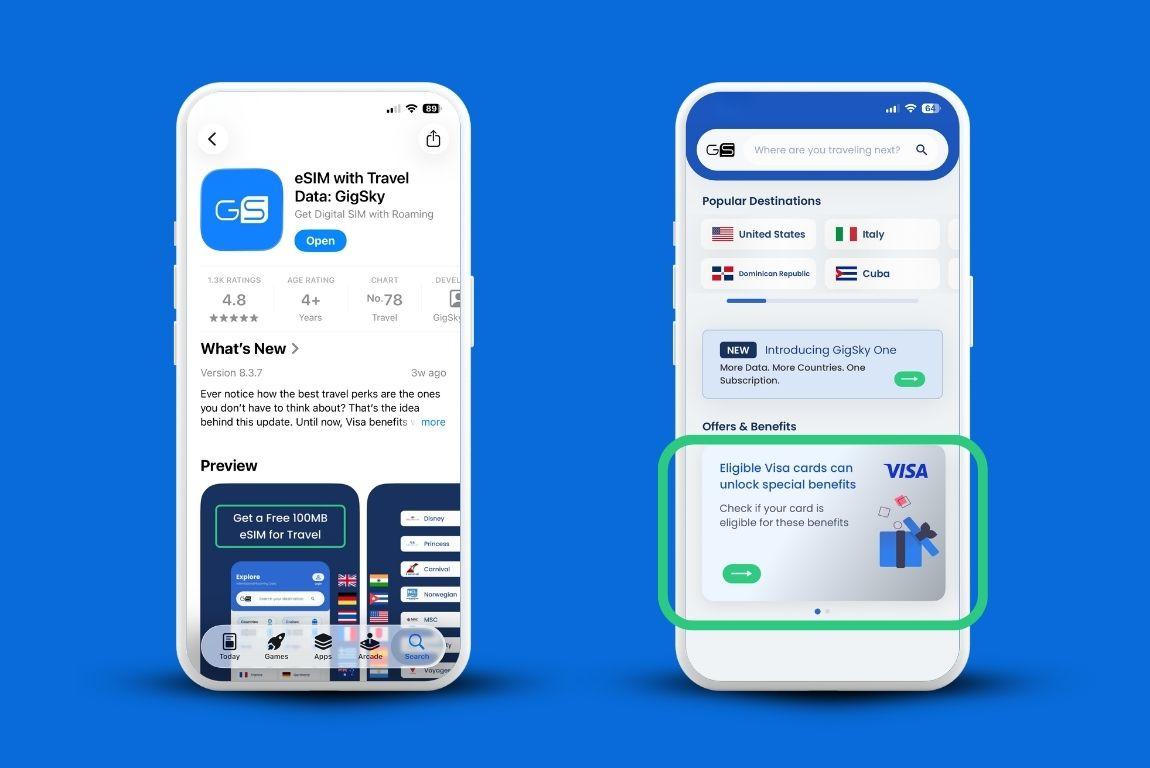
- Open the GigSky app.
- Scroll to the Offers section and tap the Visa banner.
- Enter your card number to confirm eligibility. You won't be charged. The step only verifies whether your card qualifies.
- View your available free data once confirmed.
GigSky vs. other eSIM options: what to know
GigSky runs as a mobile operator, connecting directly to local carriers, while most alternatives resell access through third-party networks.
That difference shows up in how they connect and what a trial gets you.
| Feature | GigSky | Typical Reseller eSIM |
|---|---|---|
| Network model | MVNO, connects directly to local carriers | Reseller, routes through third-party networks |
| Auto-connects on arrival | Yes, no manual setup | Varies; often manual activation |
| Coverage | 200+ countries and territories, 290+ cruise ships | Varies by provider; land only |
| Free trial | Free trial, no card needed; more for eligible Visa cardholders | Limited; varies widely |
| One eSIM for all trips | Yes, install once and reuse | Often a new eSIM or profile per country |
When does a physical SIM make more sense?
A physical SIM makes sense when your phone doesn't support eSIM at all, since neither problem can be fixed before your trip. You'll usually find kiosks at the airport or major transit hubs.
Pricing and data amounts vary by country, so it helps to look this up before you land.
How much data do you need?
Most light to moderate travelers need around 500MB per day, while heavy users who stream or work on the road should plan for 1GB or more per day.
To estimate your trip total, multiply your daily use by the number of days you're traveling.
If you're crossing several countries, a regional plan saves you the hassle of juggling separate plans as you move.
Quick troubleshooting checklist
Work through this in order before assuming something is seriously wrong:
- Restart your phone.
- Confirm Cellular Data is ON.
- Confirm Data Roaming is ON.
- Confirm the eSIM, not the physical SIM, is selected for cellular data.
- Verify your APN if your provider requires a custom one.
- Step outside to rule out a dead zone.
- Check device compatibility at gigsky.com/device-compatibility.
- Try a free GigSky trial to see if a different network resolves it.
FAQ
Why is my eSIM not working when I have full signal bars but no data?
Full bars with no data usually means your provider isn't routing a strong local network, or the wrong line is selected for cellular data. Restart first, then confirm your eSIM is the active data line.
My eSIM is not working with healthy bars points at the network behind the eSIM, not the signal itself.
Do I need to manually select a network?
No, not with GigSky. It connects automatically to the best available local network, so there's nothing to pick. With some other providers you may need to select a network by hand.
Will a local physical SIM mess up my existing eSIM profile?
No. Inserting a physical SIM doesn't delete or overwrite your eSIM profile. Just confirm which line is active for data afterward.
How do I know if my iPhone is unlocked?
Open Settings, then General, then About, and find Carrier Lock. If it says "No SIM restrictions," your iPhone is unlocked.
Is the free GigSky trial really free?
Yes. You can redeem a free eSIM trial with no credit card required. Eligible Visa cardholders get up to 5GB of free data, and confirming your card never charges you.
Recap: eSIM Not Working
- Most issues come down to a faulty install, a locked phone, compatibility, or a weak provider network.
- A restart fixes many problems. Check Cellular Data, Data Roaming, and APN if it doesn't.
- On iPhone, look for "No SIM restrictions" under Carrier Lock in Settings > General > About to confirm it's unlocked.
- If your phone is compatible and unlocked but data still won't load, the issue is likely your provider's network.
- A free GigSky trial lets you test a different network before spending more.
- Eligible Visa cardholders can access more free data through the Visa banner in the app.
- If your phone is locked or incompatible, a local physical SIM is the practical next step.
To get started, download the GigSky app, search your destination, and check what free data is available. If you have an eligible Visa card, tap the Visa banner inside the app to see your full benefit.