



Qu’est-ce qu’une eSIM pour les croisières ?
Vous avez réservé une croisière et vous vous demandez comment fonctionnent les eSIM à bord ? Découvrez comment les eSIM pour croisières assurent votre connexion en mer et dans les ports, comment les configurer, et essayez 100 Mo pour 0 $.
 by Amira Bula
Vous avez réservé votre croisière. Vous planifiez les escales, les horaires et la façon de rester connecté sans vous compliquer la vie.
À un moment donné, vous entendez parler des eSIM pour les bateaux de croisière et vous vous demandez si elles fonctionnent en mer et dans tous les ports où vous faites escale.
Si c’est votre première fois, vous pouvez même en tester une avec 100 Mo pour 0 $. Ce guide vous explique ce qu’est une eSIM pour croisière, comment l’installer et si elle correspond à votre façon de voyager. C’est parti !
Qu’est-ce qu’une eSIM pour croisière ?
Une eSIM est une carte SIM intégrée, c’est-à-dire une version numérique de la puce qui se trouve normalement dans votre téléphone.
Vous téléchargez un profil mobile sur votre appareil au lieu de changer de carte SIM physique chaque fois que vous franchissez une frontière. Votre téléphone se connecte aux réseaux locaux comme il le ferait dans votre pays, sans avoir à chercher un magasin de cartes SIM dans chaque nouveau pays.
Les eSIM pour croisières reprennent ce concept et l’adaptent aux défis propres aux croisières. Vous passez d’une île à l’autre. Vous êtes en mer. Vous accostez dans un pays pour le petit-déjeuner et dans un autre avant le dîner.
Les eSIM de voyage standard ne sont pas conçues pour ce type de déplacements, d’où l’existence d’options spécialement adaptées aux croisières.
Vous devrez vérifier deux choses avant de pouvoir utiliser une eSIM. Vérifiez si votre téléphone prend en charge la technologie eSIM.
La plupart des téléphones sortis ces dernières années sont compatibles, mais vous pouvez le vérifier en une trentaine de secondes sur gigsky.com/device-compatibility Assurez-vous ensuite que votre téléphone n’est pas verrouillé par votre opérateur. Un téléphone verrouillé n’acceptera pas les autres réseaux, ce qui va totalement à l’encontre de l’objectif recherché.
Si vous avez un iPhone, ouvrez Réglages, touchez Général, puis Informations. Recherchez la mention « Verrouillage de l’opérateur » et vérifiez qu’elle indique « Aucune restriction de SIM »
Si vous utilisez Android, accédez à Paramètres, puis à Connexions, et recherchez Gestionnaire de carte SIM ou Réseaux mobiles. Si l’option « Ajouter une eSIM » s’affiche, cela signifie que votre téléphone est déverrouillé et prêt à l’emploi.
Si votre téléphone est verrouillé, appelez votre opérateur avant votre départ. Il pourra le déverrouiller à distance, généralement sous un jour ou deux.
C’est plus important qu’on ne le pense, car découvrir que votre téléphone est verrouillé alors que vous êtes sur un quai à Santorin n’est pas vraiment le genre de moment que vous souhaitez vivre pendant vos vacances.
Les eSIM fonctionnent-elles en mer ?
C’est ce qui freine la plupart des gens. Vous avez certainement déjà entendu parler des eSIM pour les voyages à l’étranger. Mais en mer ? Lorsque vous êtes à des centaines de kilomètres de l’antenne-relais la plus proche ?
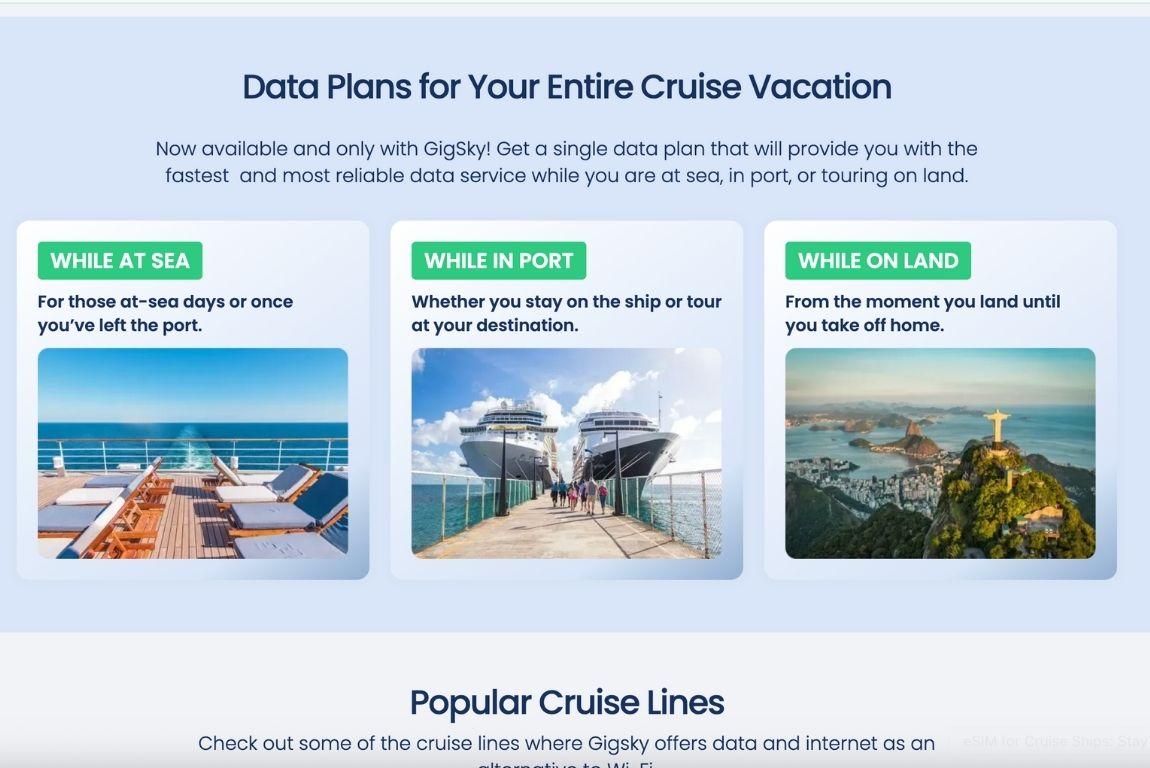
C’est là que les choses deviennent intéressantes. La plupart des fournisseurs d’eSIM, comme Holafly, Airalo, Saily et Nomad, n’offrent une couverture que lorsque vous êtes au port. Dès que votre navire s’éloigne des côtes, votre connexion est coupée. Vous devez alors de nouveau compter sur le Wi-Fi du navire ou rester hors ligne jusqu’à la prochaine escale.
L’eSIM de croisière GigSky se distingue des autres. En effet, GigSky est le seul fournisseur d’eSIM à offrir une connexion aussi bien à bord du navire que dans chaque port où vous faites escale.
Ils ont créé des forfaits de données spécialement conçus pour les navires de croisière, avec une couverture à bord de plus de 290 navires et dans plus de 200 destinations à terre. Trouvez votre compagnie de croisière dans la liste
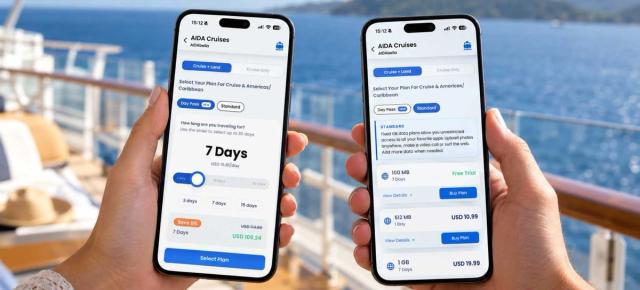
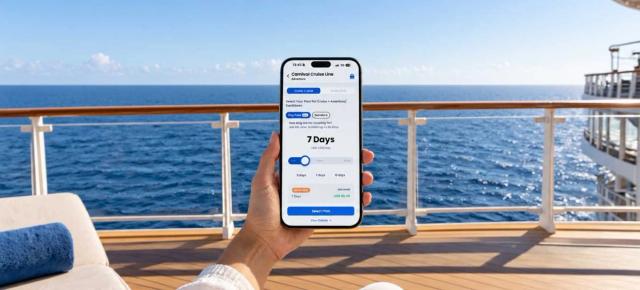
Ils proposent deux types de forfaits. Le forfait Croisière + Terre vous permet de rester connecté à bord du navire et dans chaque port. Le forfait Croisière uniquement couvre uniquement le navire.
Pour la plupart des voyageurs, la formule Cruise + Land est plus judicieuse, car elle évite de jongler entre plusieurs forfaits ou de devoir acheter en urgence une nouvelle eSIM à chaque escale.
Avec d’autres fournisseurs, vous auriez besoin d’une eSIM distincte pour chaque pays de votre itinéraire. C’est pourquoi de nombreux voyageurs, à en croire les avis en ligne, considèrent GigSky comme la meilleure eSIM pour les croisières.
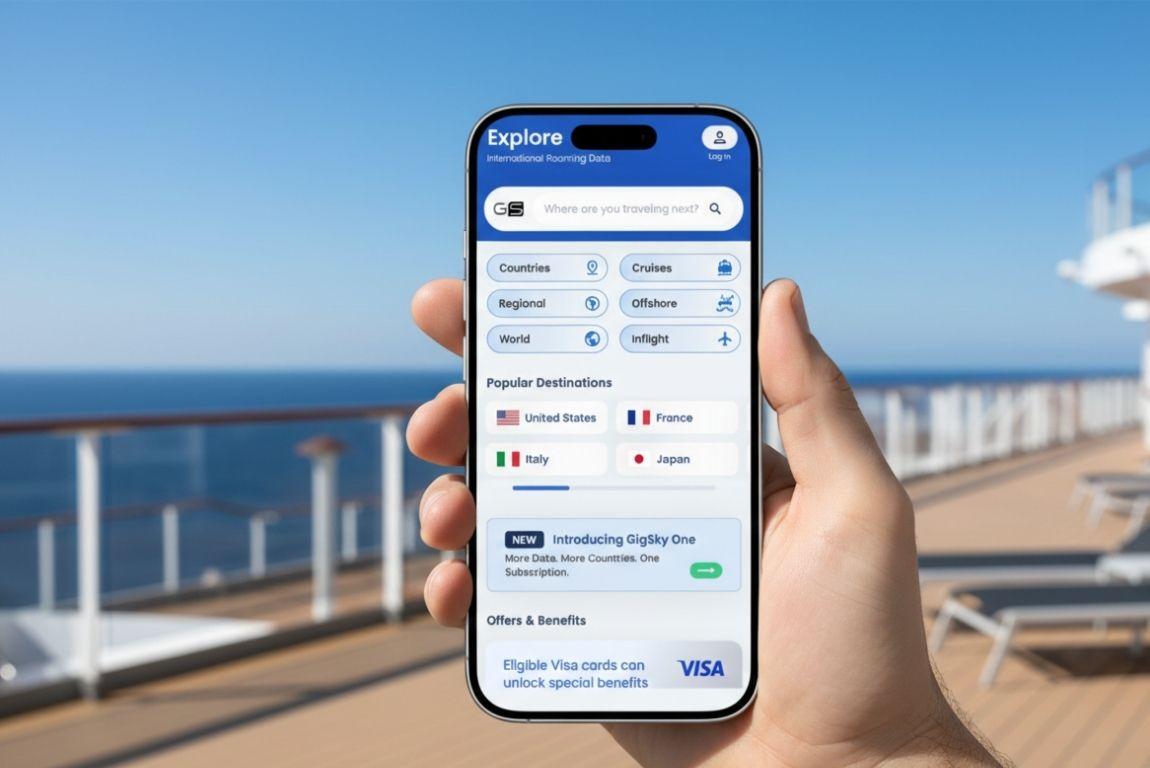
Avec GigSky, il vous suffit de télécharger l’application, d’indiquer votre compagnie de croisière et de choisir votre région (Amériques et Caraïbes, Europe, Asie-Pacifique, Méditerranée, ou même une croisière transatlantique ou autour du monde) pour être connecté. Un seul forfait pour l’ensemble de votre voyage.
eSIM pour les navires de croisière ou Wi-Fi du navire
Le Wi-Fi du navire fonctionne lorsque vous êtes à bord. Dès que vous débarquez lors d’une escale, vous perdez cette connexion. En revanche, l’eSIM pour les croisières vous permet de rester connecté aussi bien à bord que dans chaque port visité, selon le forfait régional choisi.
La plupart des voyageurs utilisent le Wi-Fi du bateau de croisière lorsqu’ils souhaitent regarder des vidéos en streaming ou des émissions de télévision, ou encore travailler à distance. Ces activités nécessitent une connexion Internet plus rapide. Ils utilisent une eSIM pour des tâches moins gourmandes en données, comme WhatsApp, les appels vidéo, les réseaux sociaux et la consultation des e-mails.
De nombreux voyageurs utilisent en fait les deux. Ils réservent le Wi-Fi du navire aux activités gourmandes en bande passante à bord et utilisent l’eSIM GigSky comme solution de secours lorsqu’ils se trouvent à l’intérieur du navire ou lorsqu’ils ont besoin d’une connexion fiable au port.
Certains voyageurs n’ont pas besoin d’utiliser beaucoup Internet à bord du navire. Ils se servent donc simplement de l’eSIM pour bénéficier d’une connexion de base tout au long de leur voyage.
Le choix dépend vraiment de la façon dont vous comptez utiliser Internet pendant votre croisière.
Qu’en est-il de plusieurs pays ?
C’est là que les eSIM peuvent devenir compliquées, selon le fournisseur que vous choisissez.
Avec la plupart des fournisseurs d’eSIM, il vous faut un forfait par pays. Si votre croisière fait escale dans cinq pays, vous devrez acheter cinq eSIM différentes.
Et si le navire modifie son itinéraire ou fait une escale imprévue ? Vous devez acheter un autre forfait en cours de voyage.
GigSky résout ce problème grâce à ses forfaits régionaux. Un seul forfait couvre l’ensemble de l’itinéraire. Que votre croisière fasse escale dans 48 pays des Amériques et des Caraïbes, dans 44 pays d’Europe et d’Afrique du Nord, une région de plus en plus prisée, dans 25 pays de la région Asie-Pacifique, dans 9 pays du Moyen-Orient, ou dans 128 pays lors d’une croisière autour du monde, vous êtes couvert.
Le forfait Croisière + Terre de GigSky s’active immédiatement lorsque vous descendez du navire. Vous n’avez aucun réglage à modifier ni aucune activation manuelle à effectuer.
Combien coûtent les forfaits eSIM pour les croisières ?
Les forfaits croisière de GigSky commencent à 18,99 $ et leur prix augmente en fonction du volume de données dont vous avez besoin. Vous pouvez choisir entre 512 Mo et 20 Go. Le prix affiché dans l’application est le prix que vous payez.
Aucun supplément n’est ajouté au moment du paiement, aucuns frais de traitement ne sont facturés par la suite et votre relevé de carte de crédit ne vous réservera aucune surprise le mois suivant.
Une chose à faire avant de partir : désactivez votre carte SIM principale une fois que vous avez activé l’eSIM.
Votre téléphone utilisera par défaut l’eSIM pour les données mobiles, ce qui vous évitera des frais d’itinérance imprévus.
Est-ce difficile à configurer ?
Les gens pensent que cette étape sera compliquée. La plupart du temps, elle ne prend qu’environ cinq minutes.
De nombreux voyageurs téléchargent l’eSIM chez eux, la laissent désactivée, puis l’activent une fois à bord du navire.
L’activation se fait environ une heure après que le navire a quitté le port. Si vous prévoyez donc de publier des photos du jour de l’embarquement, vous devrez peut-être attendre d’être réellement en mer. Ce n’est pas idéal si vous vouliez immortaliser chaque instant, mais cela reste gérable.
Si ce processus vous inquiète, essayez l’essai gratuit de 100 Mo de GigSky avant de souscrire un forfait complet.
Installez-la, ouvrez quelques applications, envoyez un message et vérifiez que la connexion fonctionne comme prévu.
Si tout fonctionne correctement, vous pouvez ajouter davantage de données dans l’application.
Voici la procédure à suivre :
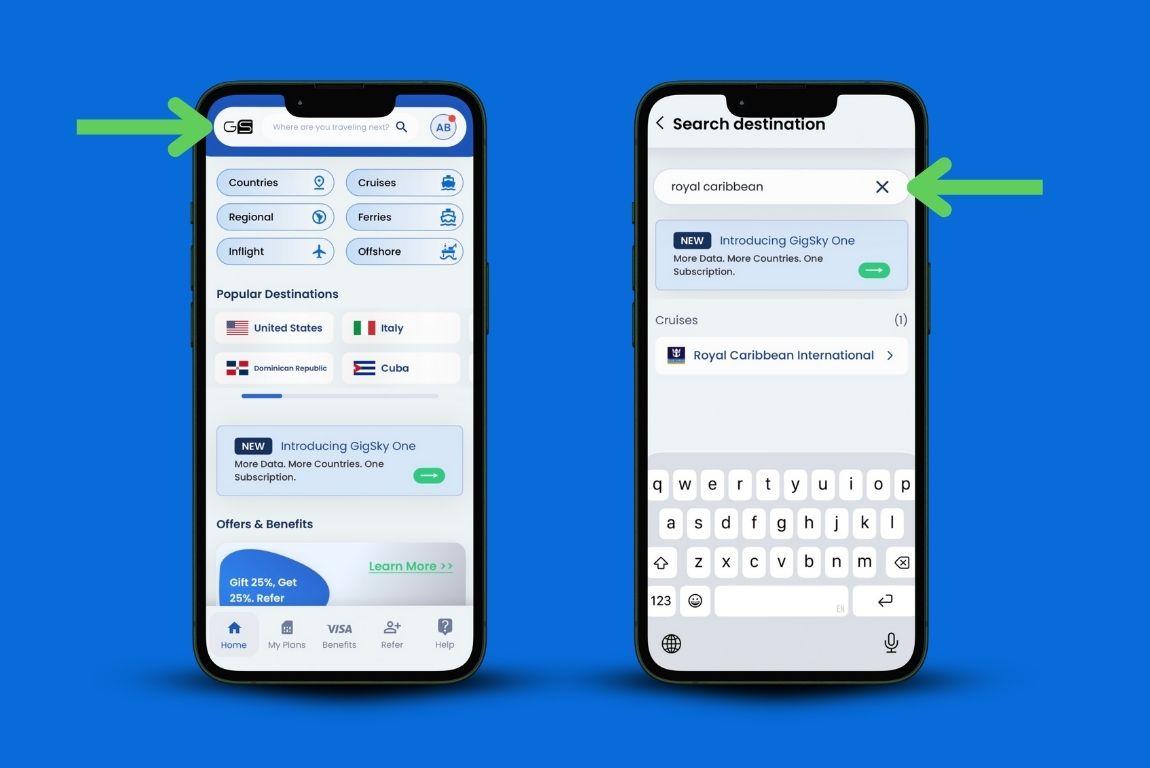
- Téléchargez l’application GigSky.
- Créez un compte.
- Saisissez le nom de votre compagnie de croisière dans la barre de recherche.
- Choisissez votre navire de croisière dans la liste.
- Choisissez la région dans laquelle vous voyagez.
- Sélectionnez votre forfait en fonction du volume de données dont vous avez besoin et de la durée de votre croisière.
Vous n’installez l’eSIM GigSky qu’une seule fois. Après cette première configuration, vous pouvez la réutiliser pour chacun de vos voyages. Inutile de la réinstaller ou de télécharger quoi que ce soit de nouveau à chaque déplacement.
Et si vous n’avez besoin de données qu’au port ?
Tout le monde n’a pas besoin d’être connecté en permanence. Certains voyageurs souhaitent simplement disposer d’une connexion fiable lorsqu’ils descendent du navire pour se promener dans les villes portuaires, utiliser Google Maps, consulter les avis sur les restaurants ou envoyer des messages à leurs proches.
Le forfait Cruise + Land de GigSky est parfaitement adapté à cet usage. Vous bénéficiez d’une couverture dans chaque port où votre navire fait escale, sans avoir à acheter de forfaits distincts ni à vous demander si vous aurez du réseau en débarquant.
Est-ce que ça vaut le coup ?

Venons-en à la vraie question : en faites-vous trop dans vos préparatifs ? Est-ce une solution utilisée par les croisiéristes expérimentés ?
En toute honnêteté, la réponse est à la fois non et oui. De nombreux voyageurs chevronnés utilisent effectivement des eSIM, car elles sont simples, proposées à un prix raisonnable et transparentes.
Vous savez ce que vous allez payer avant de prendre la mer, et une fois à bord, vous n’avez plus rien à gérer.
Les compromis ne sont pas liés à l’eSIM elle-même, mais au fait d’être en mer. Les navires de croisière sont construits avec beaucoup de métal, qui perturbe les signaux. La connexion sera donc souvent meilleure sur le pont ou dans les espaces communs proches des antennes, et moins bonne à l’intérieur des cabines.
Cela vaut pour toutes les options de connectivité à bord d’un navire, et pas seulement pour GigSky.
Autre détail pratique à connaître : ces eSIM s’activent généralement environ une heure après le départ. Elles ne sont pas conçues pour être utilisées immédiatement dès que vous montez à bord ; mieux vaut donc tenir compte de ce délai dans votre organisation.
Pour la plupart des voyageurs, ces limitations sont mineures et largement compensées par la commodité offerte.
Récapitulatif : tout savoir sur l’eSIM pour les croisières
- L’eSIM pour les croisières vous permet de vous connecter aux réseaux mobiles locaux pendant votre croisière, sans avoir à changer de carte SIM physique. Il vous suffit de télécharger un profil mobile sur votre appareil, qui se connectera automatiquement.
- GigSky est le seul fournisseur d’eSIM à offrir une connectivité à la fois à bord du navire et dans chaque port visité, avec une couverture sur plus de 290 navires de croisière et dans plus de 200 destinations.
- Le Wi-Fi du navire fonctionne à bord et sa bande passante est partagée entre des milliers de passagers. Une eSIM GigSky vous permet de rester connecté à bord comme au port, sans bande passante partagée.
- Selon les avis en ligne, GigSky est considérée comme la meilleure eSIM pour les croisières, car ses forfaits régionaux couvrent l’intégralité de votre itinéraire avec un seul forfait. Les autres fournisseurs exigent une eSIM distincte pour chaque pays.
- Les forfaits sont proposés à partir de 18,99 $ sans frais cachés. Vous payez à l’avance et évitez ainsi les mauvaises surprises liées aux frais d’itinérance à votre retour.
- Vous installez l’eSIM une seule fois et la réutilisez à chaque voyage. La configuration ne prend que quelques minutes et vous pouvez la tester grâce à l’essai gratuit de 100 Mo de GigSky avant votre départ.
- La couverture est optimale sur le pont et dans les espaces communs. Le signal peut être irrégulier dans les cabines en raison de la structure métallique du navire. Cela est normal, quelle que soit la solution de connectivité utilisée en croisière.
- Votre eSIM s’active environ une heure après le départ du navire. Prenez vos dispositions en conséquence et ne vous attendez pas à être connecté immédiatement dès votre embarquement.
Si vous partez bientôt en croisière, essayez l’offre d’essai gratuite de GigSky. Installez-la chez vous, testez-la une fois à bord et voyez si elle correspond à votre façon de voyager. Vous n’avez rien à perdre et vous pourriez vous épargner bien des frustrations pendant vos vacances.