

%20(1)%201%20(1).webp)


Como posso saber se meu celular está desbloqueado? Em menos de 1 minuto (iPhone e Android)
%20(50).jpg)
Então você está planejando uma viagem para o exterior e alguém lhe disse para adquirir um eSIM para evitar cobranças inesperadas de roaming. Boa ideia. Mas aí você começa a se perguntar: espere aí, como faço para saber se meu celular está desbloqueado?
Boa pergunta. E é algo em que a maioria das pessoas só pensa quando já está no aeroporto, tentando conectar-se à internet e percebendo que o celular não está colaborando.
Essa questão do desbloqueio confunde as pessoas porque parece algo técnico. Mas a verificação leva menos de um minuto, e fazer isso agora significa que você não vai ficar preocupado com isso mais tarde.
E se for a primeira vez que você experimenta um eSIM, o GigSky oferece até 3 GB grátis para você testar, assim você pode ter certeza de que tudo funciona no seu celular antes de assinar um plano pago.
Celulares bloqueados vs. desbloqueados
Quando você compra um celular da AT&T, Verizon, T-Mobile ou qualquer outra operadora com um plano de parcelamento, elas geralmente bloqueiam o aparelho para que ele funcione apenas na rede delas. Esse bloqueio impede que você use o cartão SIM de outra operadora. Isso faz com que você continue sendo cliente delas.
Enquanto isso, você pode usar um celular desbloqueado com qualquer operadora que desejar. Mude de operadora no seu país, insira um chip local no exterior ou instale um eSIM acessível de uma empresa como a GigSky. Não é preciso autorização.
O fato de o celular estar desbloqueado não significa automaticamente que ele seja compatível com eSIM. A maioria dos celulares mais recentes é compatível, mas vale a pena confirmar se o seu aparelho suporta eSIM.
É por isso que você precisa verificar essas duas coisas antes de sair. Leva menos de um minuto. Verifique se o seu celular está desbloqueado e, em seguida, se ele é compatível com eSIM.
Como verificar
Não é preciso ligar para a sua operadora e ficar na fila de espera; verifique primeiro as suas configurações.
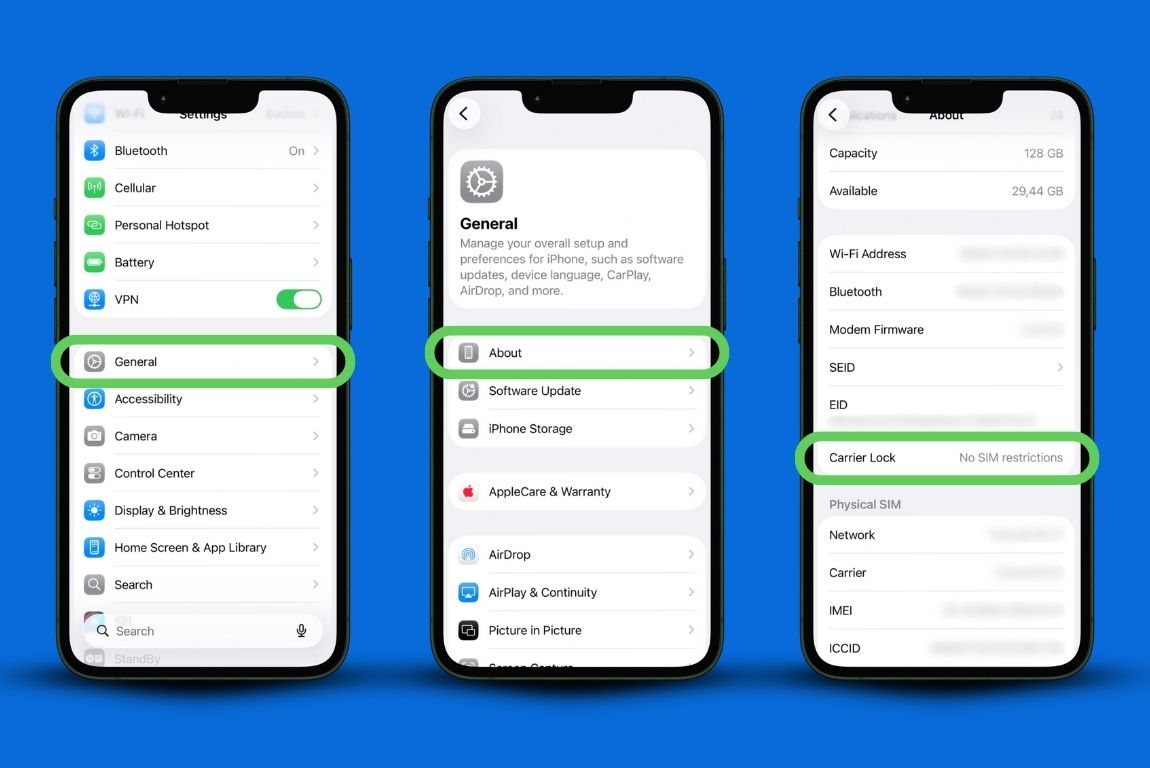
iPhone: Vá em Ajustes, toque em Geral e, em seguida, em Sobre. Role a tela para baixo e procure a seção intitulada “Bloqueio da operadora”. Se estiver escrito “Sem restrições de SIM”, o aparelho está desbloqueado. Qualquer outra indicação significa que ele está bloqueado.
Android: Abra as Configurações e vá até Conexões. Toque em “Mais configurações de conexão” e verifique o “Status do bloqueio de rede”. Se estiver indicado “Desbloqueado”, seu celular está desbloqueado.
Outros aparelhos: Vá até "Configurações" e role a tela até o final, até "Sobre o telefone". Toque em "Detalhes do aparelho", role a tela para baixo e verifique "Bloqueio de rede". Se estiver indicado "Desbloqueado", seu telefone está desbloqueado.
Se você ainda não tem certeza, pense em como comprou seu celular. Você pagou o preço total à vista? Então, provavelmente, seu celular está desbloqueado.
Você financiou o aparelho pela operadora e já terminou de pagá-lo? É possível que eles tenham desbloqueado automaticamente. Ainda está pagando as parcelas? É quase certo que esteja bloqueado.
Faça este teste rápido: peça emprestado o cartão SIM de um amigo de outra operadora. Coloque-o no seu celular. Se funcionar, o aparelho está desbloqueado. Se o celular exibir uma mensagem de erro ou não reconhecer o cartão, ele está bloqueado.
Ou entre em contato com sua operadora. A maioria oferece chat online hoje em dia, o que é muito mais rápido do que ligar. Pergunte diretamente: “Como posso saber se meu celular está desbloqueado?” Eles verificarão sua conta e responderão em segundos.
Se o aparelho estiver bloqueado, mas você tiver cumprido os requisitos (pago o celular, cumprido o contrato), eles podem desbloqueá-lo remotamente. Geralmente, isso ocorre em um dia.
Por que os celulares são bloqueados, para começar
As operadoras bloqueiam os celulares porque subsidiaram o custo na hora da compra. Elas ofereceram um desconto por meio desse plano de pagamento, então querem garantir que você permaneça com elas por tempo suficiente para saldar a dívida. Faz sentido do ponto de vista delas.
A maioria das operadoras desbloqueia os aparelhos automaticamente assim que você quitar todas as prestações. Mas se você comprou seu celular recentemente, mudou de operadora no meio do contrato ou adquiriu um aparelho pré-pago, ainda pode haver restrições.
A FCC exige que as operadoras desbloqueiem os telefones quando você solicitar (desde que sejam cumpridas determinadas condições), mas essas condições variam de acordo com a empresa. Algumas exigem 60 dias de serviço. Outras exigem que o aparelho esteja totalmente pago. Algumas exigem ambos.
Está planejando uma viagem internacional e acabou de descobrir que seu celular está bloqueado? Entre em contato com sua operadora hoje mesmo, não na véspera do voo. O tempo de processamento varia de algumas horas a vários dias.
Isso vai funcionar onde você está indo?

Ter um celular desbloqueado já é um bom começo. Desde que seja compatível com eSIM. A maioria dos smartphones modernos é, mas você pode verificar aqui se o seu aparelho suporta eSIMs.
Os smartphones modernos são equipados com várias bandas que cobrem a Europa, a Ásia, a América Latina e praticamente qualquer lugar para onde você viaje. No entanto, alguns modelos mais antigos ou aparelhos mais baratos podem não suportar certas frequências regionais.
Boas notícias: se o seu celular for compatível com eSIM, ele funciona em qualquer lugar do mundo. Os aparelhos compatíveis com eSIM são modelos mais recentes, projetados para uso global, portanto, já incluem as bandas de frequência necessárias.
Ao instalar um eSIM da GigSky, você se conecta através das redes locais de cada país. A mesma infraestrutura que os moradores locais usam. Cobertura confiável em Roma, Tóquio, Cidade do México e em qualquer outro lugar.
Você não depende dos acordos de roaming da sua operadora local, o que geralmente significa velocidades mais lentas e custos mais altos.
A parte do eSIM
É aqui que as pessoas se confundem. “Desbloqueado” significa que você pode trocar de operadora. Mas, se quiser usar um eSIM, seu celular precisa ser compatível com eSIM.
Em geral, o iPhone XS ou modelos mais recentes são compatíveis. O Google Pixel 3 e modelos mais recentes também. Os modelos mais recentes do Samsung Galaxy. Mas verifique o seu dispositivo específico antes de fazer qualquer reserva.
Procure nas configurações por eSIM, Planos de celular (iPhone) ou configurações de rede móvel que mencionem SIMs digitais (Android). Se essas opções aparecerem, seu celular é compatível.
Você precisa dos dois: um celular desbloqueado e compatibilidade com eSIM [link para o blog: https://docs.google.com/document/d/1VV0vtn6X0YYnTs3bMDV8T2vT1j4zEXvXqBXZieA13SU/edit?tab=t.0]. Eles não são intercambiáveis. Pense nisso como ter um passaporte e um visto. Ambos são necessários, mas têm finalidades diferentes.
Se o seu celular estiver bloqueado
Ligue para sua operadora. Pergunte sobre a política de desbloqueio. Explique que você está viajando e precisa usar um eSIM. Se você atender aos requisitos, eles devem processar o pedido rapidamente.
Algumas operadoras oferecem desbloqueios temporários para viagens, embora isso varie de caso para caso. Vale a pena perguntar, especialmente se você já é cliente há algum tempo.
Se não for possível desbloquear o celular agora e sua viagem for em breve, você tem algumas opções. Alugue um celular internacional (caro). Use apenas o Wi-Fi (o que limita os lugares aonde você pode ir). Use o plano internacional da sua operadora.
Ou resolva isso agora, em vez de ficar esperando que tudo dê certo.
O que é um celular desbloqueado e o que você precisa
Vamos esclarecer uma coisa que costuma confundir as pessoas. O que é um celular desbloqueado? É um aparelho livre de restrições da operadora, o que significa que você decide qual rede usar.
Mas saber o que é um celular desbloqueado não resolve por si só o problema da conectividade durante a viagem; você também precisa de compatibilidade com eSIM para que os planos internacionais funcionem sem problemas.
Essa é a diferença que a maioria dos viajantes não percebe até se deparar com problemas de conexão no exterior.
Como desbloquear um celular antes da viagem
Se você precisa saber como desbloquear um celular, o processo é mais simples do que a maioria das pessoas imagina.
Entre em contato diretamente com sua operadora pelo aplicativo, site ou atendimento ao cliente. A maioria processa os pedidos de desbloqueio em 24 a 48 horas, desde que você cumpra os requisitos (aparelho quitado, conta em dia).
Aprender a desbloquear um celular agora evita aquele estresse de última hora no aeroporto. E, depois de saber como desbloquear um celular pela sua operadora específica, você também pode se planejar com antecedência para viagens futuras.
Algumas operadoras têm políticas diferentes, por isso vale a pena verificar com antecedência os requisitos para desbloqueio.
Quanto mais cedo você descobrir como desbloquear um celular com sua operadora, mais cedo poderá começar a usar eSIMs a preços acessíveis em vez de planos de roaming caros.
Evite ser cobrado após configurar seu eSIM
Mesmo depois de instalar um eSIM e de ele estar funcionando no exterior, sua operadora local ainda pode cobrar tarifas de roaming se você não alterar suas configurações.
Antes de viajar, desative completamente o seu número de telefone principal. No iPhone, acesse as configurações de rede móvel e desative a linha da sua operadora.
No Android, acesse as configurações do cartão SIM e desative seu número principal. Mantenha apenas o eSIM da GigSky ativo durante a viagem.
Isso impede que seu celular se conecte à sua rede doméstica em segundo plano, o que gera cobranças mesmo quando você pensa que está usando apenas o eSIM.
Os aplicativos são atualizados automaticamente. Seu celular se conecta à operadora sem pedir sua permissão.
Você ainda pode receber mensagens de texto e chamadas pelo WhatsApp ou por qualquer outro aplicativo de mensagens que use. Você fica conectado sem se preocupar com uma conta astronômica quando chegar em casa.
1 minuto agora, sem estresse depois
Verificar se o meu celular está desbloqueado leva menos tempo do que preparar o café da manhã. Basta abrir as configurações, encontrar a seção certa e ler uma linha de texto.
Se estiver indicado que não há restrições, instale seu eSIM GigSky e você estará pronto para usar em mais de 200 países. Se aparecer um cadeado, ligue para sua operadora e resolva o problema antes de fazer as malas.
Não é nada complicado. São apenas dois passos simples para que você não fique sem sinal quando chegar a um lugar novo, tentando encontrar seu hotel ou entrar em contato com seu companheiro de viagem.
Você já planejou essa viagem. Dedique mais cinco minutos para verificar se o seu celular está desbloqueado, e assim terá uma preocupação a menos quando estiver na hora de curtir a viagem.


Assine nosso blog


