

%2520(68).jpg&w=3840&q=75)


WiFi on Cruise Ships vs. GigSky Cruise eSIM: Prices for 7-Day and 14-Day Trips (2026)
You can save hundreds on cruise WiFi, but only if you know this first. Compare GigSky eSIM vs ship pricing before your trip starts.
 by Amira Bula
You’ve booked your cruise, and you’re already thinking about what you’ll pay to stay connected.
Whether you're researching WiFi on cruise ships or comparing alternatives before you sail, you don’t want surprises, you don’t want daily fees stacking up, and you definitely don’t want to figure it out mid-trip.
This guide breaks down exactly what you’ll spend on WiFi on cruise ships vs. a GigSky eSIM, so you can choose what fits your trip, your usage, and your budget.
GigSky Cruise eSIM vs. Cruise Ship WiFi
| Feature | GigSky eSIM | Cruise Ship Wi-Fi |
|---|---|---|
| Coverage at sea | Yes, 290+ ships | Yes, on your specific line |
| Coverage at every port | ✅ Auto-connects on arrival | ❌ |
| Works in cabins | Best in open/deck areas | Yes, throughout the ship |
| Device requirement | eSIM-compatible, unlocked phone | Any device |
| Setup | One-time app install, then reuse forever | Cruise portal login per trip |
| Data sharing / hotspot | ✅ (unlimited hotspot + family plan) | Varies, often restricted |
| Pricing model | Per data plan, 1–120 days | Per day, per device/person |
| Free trial | ✅ 100 MB (no card required) | ❌ |
| Best for | Light to medium use, port coverage | Heavy use, remote work, streaming |
| Visa card discount | Up to 30% off | Undisclosed |
| Voice and SMS | Data only (WhatsApp calls work) | Data only on most plans |
Coverage: Where Each One Works

GigSky covers 290+ cruise ships across the Americas and Caribbean, Europe, Asia-Pacific, and the Middle East.
It works both at sea and at every port you dock in, because the Cruise + Land plan is regional rather than country-by-country.
When your ship pulls into a port, GigSky auto-connects to the best local network. No settings to change, no manual activation. You can check whether your ship is listed at gigsky.com/data-cruises
Wi-Fi on cruise ships covers you while you're on or near the vessel. Once you step off at a port, that connectivity doesn't come with you.
If you want to use maps, post photos, or stay in touch while you're exploring ashore, you'd need a separate local solution for each destination. How consistent the signal is on the ship itself depends entirely on the cruise line.
Signal Inside the Ship
GigSky works best in open areas of the ship and on deck. Cruise ships are built with a lot of steel, which limits how well any cellular signal penetrates into interior cabins.
If you've read mixed reviews about GigSky, most of them come from people who were trying to use it inside their cabin or who didn't complete the setup correctly before sailing. In open spaces, it performs well for the kinds of tasks it's designed for.
WiFi on cruise ships uses distributed access points placed throughout the vessel, which gives it better coverage in cabins.
Setup and Compatibility
For GigSky, you need a phone that's eSIM-compatible and carrier-unlocked. Most newer iPhones and Android devices qualify, and it only takes a few minutes to confirm yours does.
To set it up, download the GigSky app, search for your cruise line, choose your region, and activate the free 100 MB trial. The app walks you through every step. One thing that sounds more complicated than it is.
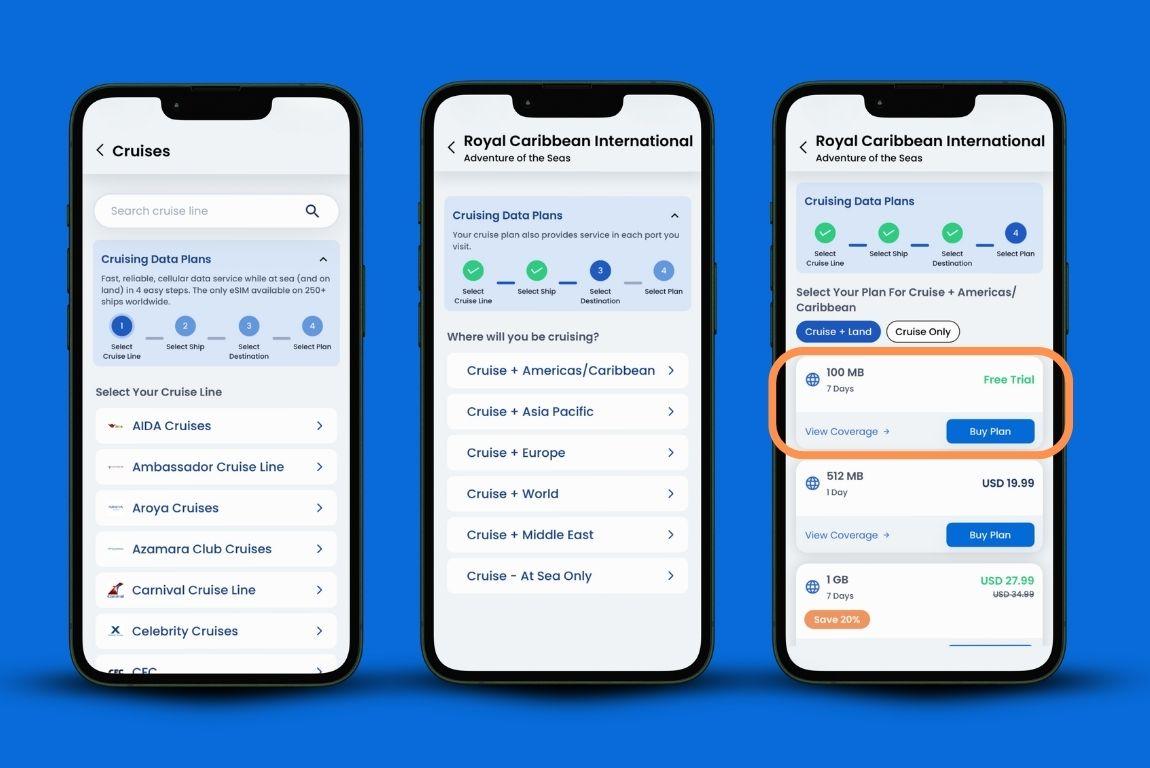
One important timing detail: install the eSIM a few hours before departure, but keep it turned off until you're on board.
Because GigSky auto-connects to the strongest nearby network, turning it on too early while you're still on land will use your cruise data before you've boarded.
Turn it on once you're aboard, and full connectivity kicks in about an hour after the ship leaves port.
The setup only happens once. After that, you reuse the same eSIM on every future cruise and across 200+ land destinations without going through this process again.
Cruise ship WiFi doesn't require any specific device. You log into the cruise line's portal, pick a package, and connect. Most lines let you pre-purchase before you sail. Any phone, tablet, or laptop works.
Sharing Data with Your Travel Group
GigSky gives you two options for sharing. If you need your tablet or laptop connected, you can hotspot from your phone, though that will burn through your data faster than using your phone alone.
If you're traveling with family, GigSky has a family plan where each person gets their own data allocation on their own device, bought through the app.
Ship Wi-Fi packages are generally sold per device and per person. Sharing one plan across multiple devices or travel companions isn't always allowed, and the rules vary by cruise line. For a family or group, the costs stack up quickly.
What Each Option Is Built For
GigSky is designed for light to medium data use: WhatsApp messages and calls, social media, email, maps at the ports, and posting photos. It's not built for remote work or video streaming.
The people who get the most out of it download their shows before sailing and use GigSky for everything else.
If you need more than that inside the ship, some travelers use GigSky for port days and a basic cruise ship WiFi package for connectivity while at sea.
Cruise Ship Wi-Fi's tiered structure makes it the better fit for heavier use. The premium tiers support video streaming, video calls, and remote work.
If you're someone who needs to stay connected for work throughout the voyage or wants to watch content without downloading it first, the ship's packages are designed for that.
GigSky is also data-only. Voice calls and SMS aren't included, but WhatsApp calls work fine over it, so in practice that covers what most travelers need.
How Far Does Your Data Go?
If you mostly use WhatsApp and check social media here and there, you'll likely stay under 500 MB per day, which is 0.5 GB. At that rate, a 3 GB plan comfortably covers a week.
If you're constantly scrolling, streaming short videos, and listening to music, you could use more than 1 GB per day, and a larger plan makes more sense.
When you hit 80% of your data, the GigSky app sends you a notification. From there, topping up is one tap inside the app. You won't get cut off without warning.
What You'll Pay
GigSky charges per data plan, not per day. Plans run from 1 to 120 days, and the pricing is the same across the Americas and Caribbean, Europe, and Asia-Pacific:
| Region | Data | Validity | Price |
|---|---|---|---|
| All regions | 100 MB | 7 days | $0 |
| Americas / Caribbean, Europe, Asia-Pacific | 3 GB | 15 days | $55.99 |
| Americas / Caribbean, Europe, Asia-Pacific | 5 GB | 30 days | $79.19 |
| Americas / Caribbean, Europe, Asia-Pacific | 10 GB | 30 days | $123.19 |
If you hold an eligible Visa card, you may qualify for up to 30% off, which brings a 5 GB plan to around $56. There's no known equivalent discount program on cruise ship Wi-Fi packages.
How Much is Cruise WiFi?
Cruise ship Wi-Fi is priced per day, per device. For a 7-day cruise, here's what that typically looks like for one person:
| Package type | Estimated 7-day cost (1 person, 1 device) |
|---|---|
| Basic (messaging and email) | $126 - $154 |
| Mid-tier (browsing, social media) | $154 - $196 |
| Premium (streaming, remote work) | $210 - $350+ |
For a 14-day cruise, those numbers roughly double:
| Package type | Estimated 14-day cost (1 person, 1 device) |
|---|---|
| Basic | $252 - $308 |
| Mid-tier | $308 - $392 |
| Premium | $420 - $700+ |
Since ship packages are sold per device, a couple each needing their own plan would multiply these figures. GigSky's family plan works differently, giving each person their own data under a shared purchase.
Trying Before You Commit
GigSky offers 100 MB of free data with no credit card required, valid for 7 days. That's enough to confirm the eSIM works on your phone, test the connection before you sail, and send a few messages. Ship Wi-Fi packages require you to purchase before you can evaluate the service.
Which One Fits Your Trip?
GigSky makes the most sense if you have multiple port stops and want connectivity that travels with you off the ship.
One plan covers every destination in the region without buying anything extra, and the port-day coverage alone often justifies the cost compared to patching together local SIM cards at each stop.
It also makes sense as a standalone solution if your usage is light to medium, meaning WhatsApp, social media, and email rather than streaming or video conferencing. The free trial removes the guesswork.
Cruise ship Wi-Fi is the better call if you're working remotely from the ship, need a strong signal inside your cabin, or want to connect a laptop or multiple devices without hotspotting.
The premium tiers are the only reliable option for sustained heavy data use throughout the voyage.
A combination of both is also common. GigSky handles port days and deck connectivity, a basic ship package covers in-cabin use, and together they often cost less than a full premium ship package for the same trip.
Test GigSky Before You Board
Download the GigSky app, search for your cruise line, and activate the free 100 MB trial without a credit card. If it works for you, topping up to a full plan takes less than a minute in the app.
If you're not sure yet, at least you'll know before you're at the port.
Recap: WiFi on Cruise Ships vs. GigSky eSIM
- GigSky covers 290+ ships and works both at sea and at every port, auto-connecting when you dock. Cruise ship Wi-Fi covers you on the vessel but stops at the gangway.
- GigSky works best in open areas on deck. Ship Wi-Fi has better signals in cabins and corridors.
- GigSky requires an eSIM-compatible, unlocked phone. Ship Wi-Fi works on any device.
- GigSky setup is a one-time process. After that, the same eSIM reuses across all future trips.
- GigSky data costs for cruise ships: $55.99 for 3 GB / 15 days, $79.19 for 5 GB / 30 days, $123.19 for 10 GB / 30 days.
- How much is Cruise WiFi? It costs roughly $126 to $350+ for 7 days, per person, depending on the tier and cruise line.
- GigSky has a free 100 MB trial with no credit card. Ship Wi-Fi requires purchase to test.
- For light use, 500 MB per day is plenty. For heavy scrolling and video, plan for 1 GB or more per day.
- The GigSky app notifies you at 80% usage so you can top up with one tap before you run out.
- Eligible Visa cardholders can get up to 30% off GigSky plans. No equivalent ship Wi-Fi discount exists.
- Many travelers use both: GigSky for ports and on deck, a basic ship package for cabin use.