

%2520-%25202026-07-09T155929.060.jpg&w=3840&q=75)


How an eSIM Top Up Works and When You Need a New Plan Instead
Confused about eSIM top-ups mid-trip? Here's exactly when to top up, when to buy a new plan instead, and how long it actually takes.
 by Amira Bula
If you're still in the same region you bought your plan for and you're just running low, an eSIM top up adds more data to your existing eSIM in a couple of taps, no new install needed.
If you've crossed into a different region, though, a top up won't work. You'll need a new plan instead.
Below, we'll walk through how to top up eSIM on iPhone using the GigSky app, when topping up makes sense, and what it costs compared to just buying more data upfront.
Here's the quick version, depending on where you are in your trip:
| Your situation | What to do |
|---|---|
| Still in the same country or region as your current plan | Top up your existing plan |
| Heading to a new country outside your current plan's coverage | Buy a new plan |
| Data's about to run out but your trip isn't over | Top up before it expires, not after |
| Not sure how much data you'll need for the whole trip | Start with a free trial to gauge usage first |
What counts as an eSIM top up versus a new plan?
A top up adds data to a plan you already own, for the same coverage area you already bought.
A new plan is a separate purchase for a different destination or region. If you bought a Europe plan and you're still in Europe, that's a top up.
If you fly from Europe to Japan, that's a new plan. There's no way around this distinction.
It's tied to how the coverage area was originally configured, not to how much data is left.
How to top up eSIM on iPhone with the GigSky app
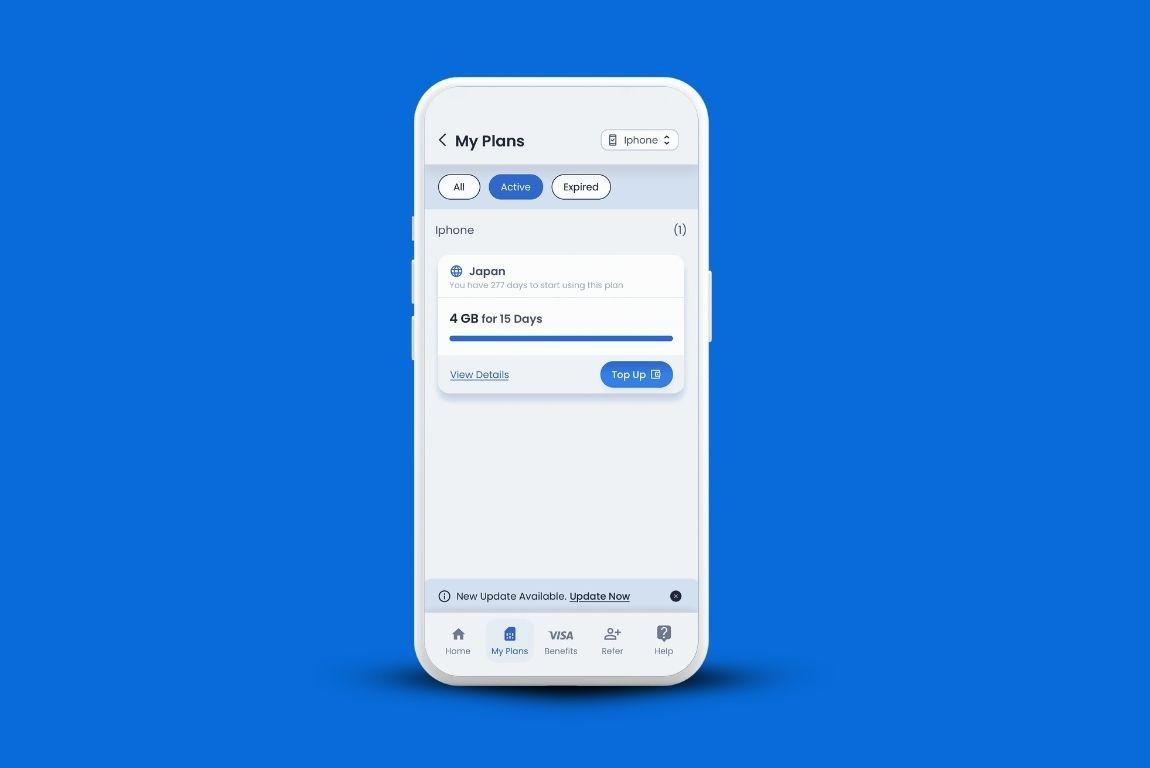
Open the GigSky app and go to My Plans. Your active plan sits at the top with a Top Up button next to it.
Tap it, choose how much data you want to add, and confirm the purchase. That's the whole process, and it takes under a minute if your connection is steady.
A few things worth knowing before you tap confirm:
- Open My Plans in the app.
- Find your active plan and tap Top Up.
- Select the amount of data you need.
- Confirm and pay. It's added instantly if you have a connection.
Do this before your data actually hits zero. A weak signal or spotty Wi-Fi at the worst possible moment is not when you want to be troubleshooting a purchase.
When should you actually top up?
Timing matters more than most people realize. If you're on a standard plan, you'll get a notification once you've used 80% of your data, which is your cue to decide whether you need more.
Unlimited plans get a heads-up on the last day of validity instead, since there's no gigabyte count to track.
Topping up before your plan runs out also extends your expiration date, so you don't lose connectivity while a purchase processes.
Waiting until you're already out is the riskier move. If you've got no signal at that point, you're stuck until you find one.
What does an eSIM top up cost?
Top-up pricing matches the price of buying a fresh plan of the same size, there's no discount for adding on versus starting new.
That's actually the reason buying the full amount of data you'll need for a trip, upfront, tends to work out cheaper than topping up in smaller increments as you go.
If you're not sure how much data your trip will actually require, GigSky's free trial solves that problem before it costs you anything.
Run it on day one, see your real usage, then size your plan around that number instead of guessing.
Traveling across multiple countries on one GigSky eSIM
One eSIM and its top-ups can cover an entire multi-country trip, as long as every country you're visiting falls under the same regional plan.
Before you go, check the Regional section of the app and tap View Details on any plan to see the full country list.
Your GigSky eSIM switches automatically to the strongest local network as you cross borders inside that region, no manual settings, no reinstalling.
If even one stop on your itinerary falls outside that region, though, you're back to buying a separate plan for it.
What if you're out of data with no Wi-Fi?
This is the scenario people worry about most, and it's a fair concern.
Top-ups need at least some connection to process, so the safer play is topping up the moment you get that 80% notification, not waiting until you're at zero in a dead zone.
If you do get stuck, find any open network, even a slow one, long enough to complete the purchase.
Can you get a refund for unused data?
No. Once data is on your eSIM, it's yours to use or lose, GigSky doesn't refund unused gigabytes. This is exactly why running a free trial first, or checking your usage from a previous trip, beats guessing and overbuying.
FAQs
Do I need Wi-Fi to complete an eSIM top up? You need some form of internet connection, but it doesn't have to be strong. A weak cellular signal or a public network at a cafe is usually enough.
How to top up eSIM on iPhone without losing my current plan? Topping up adds to your existing plan rather than replacing it. Your coverage, validity, and remaining data all carry over, nothing gets reset.
Does topping up change my local network connection?No. You stay connected to the same networks your plan already uses. If a stronger local signal becomes available, your eSIM switches to it automatically.
Can I set up automatic top-ups?It depends on your eSIM provider. This isn’t available with the GigSky eSIM. You'll get a notification at 80% usage (or on your last day for unlimited plans), and you decide from there whether to add more.
Is it cheaper to top up or buy a bigger plan from the start?Buying the data you need upfront is almost always cheaper. Top-up pricing matches fresh-plan pricing, so smaller, repeated purchases add up faster than one larger one.
Quick recap: eSIM top-ups
- Top up only works within the same coverage area as your original plan
- Crossing into a new region means buying a new plan, not topping up
- Topping up before you hit zero extends your expiration date and avoids gaps
- Pricing is the same as a fresh plan, so buying enough data upfront usually costs less
- There's no refund on unused data, so a free trial is worth running before committing to a full plan
Every eSIM top up comes down to one question: are you still in the same coverage area you started in? If yes, tap Top Up and you're set in under a minute.