

%2520(99).jpg&w=3840&q=75)


How to Get an eSIM USA or SIM Card for the World Cup 2026
Landing in the US without data during World Cup 2026 sounds stressful. Here’s what experienced travelers set up first.
 by Amira Bula
You've probably already spent way too much time refreshing ticket pages, figuring out flights, and rearranging your itinerary to fit one more match in.
Now comes the part people forget until they land: getting data working.
Because this tournament is going to involve a lot of moving around. One day you're in Dallas, the next you're trying to call an Uber outside a stadium in Houston with 70,000 other people doing the exact same thing.
Your phone becomes everything during the World Cup. Tickets. Maps. Group chats. Last-minute hotel info. Photos after the match.
This guide breaks down the difference between an eSIM USA and local SIM cards for World Cup 2026 travel, including pricing, setup, and what makes sense if you're bouncing between the US, Canada, and Mexico.
And if you have an eligible Visa card, you may qualify for up to 7 days of free unlimited eSIM data across all three countries.
The First Thing to Check Before You Buy Anything
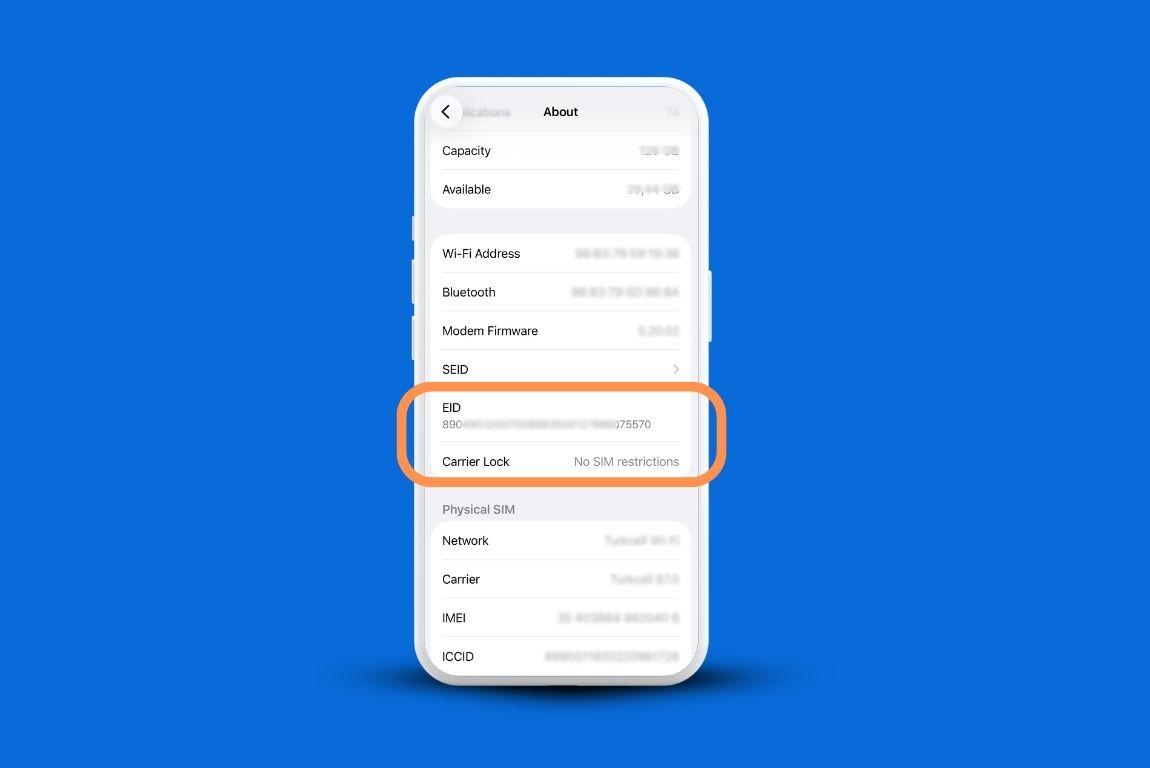
Before you commit to any plan, physical or digital, you need to know whether your phone supports eSIM. It takes about 90 seconds to find out.
Dial *#06# on your phone. If an EID number appears on screen, you're good. If nothing comes up, go to Settings, then General, then About, and look for it there.
Most iPhones from the XR and newer have it, along with Google Pixel phones and Samsung Galaxy S20 and above.
You also need to check whether your phone is unlocked. Go to Settings, General, About, Carrier Lock. It should say "No SIM Restrictions."
Anything else means the phone is still tied to your home carrier, which sometimes happens when you're still on a payment plan.
Worth confirming before you're standing at baggage claim trying to sort it out.
If your phone checks both boxes, you can skip the physical SIM entirely.
eSIM or Physical SIM: What's Different
| Feature | eSIM (GigSky) | Physical SIM |
|---|---|---|
| Setup location | At home, before your flight | At a store after landing |
| Connected on arrival | Yes, automatically | Only after SIM is inserted and activated |
| Home SIM stays in phone | Yes | No, must remove it |
| North America coverage | One plan covers US, Canada, Mexico | Country-specific, may vary |
| Voice calls | Via WhatsApp/FaceTime (data-based) | Yes, local number included |
| Free data available | Yes, via eligible Visa benefit | No |
| ID required to purchase | No | Often yes |
People ask about this a lot, so let's be clear about what each one actually means for your trip.
A USA SIM card gives you a local US number, which is useful if you need to receive text verification codes or place domestic orders with delivery. That's the main advantage.
Beyond that, for calls, you can use WhatsApp, FaceTime, or any internet-based calling app without needing a local number at all.
A few things are worth considering with a physical SIM. You'd need to remove your home SIM card and keep it safe somewhere for the duration of the trip.
Depending on where you land, getting connected can also mean stopping by a kiosk or mobile store after a long flight, showing ID, and setting everything up before your data starts working.
With an eSIM USA, your home SIM stays in your phone. There's no physical card to lose.
You download an app, install the plan digitally, and if you set it up before your flight, your phone connects automatically when you land. No store visit. No activation step. Connected before you even clear passport control.
For a tournament that spans multiple cities across the US, Canada, and Mexico, the North America eSIM coverage is a clear advantage.
A physical SIM purchased in New York might not cover you the same way when you're in Los Angeles or crossing into Toronto or Guadalajara for the knockout rounds. A North America eSIM plan covers all three countries under one plan.
Option 1: How to Get a USA eSIM for the World Cup
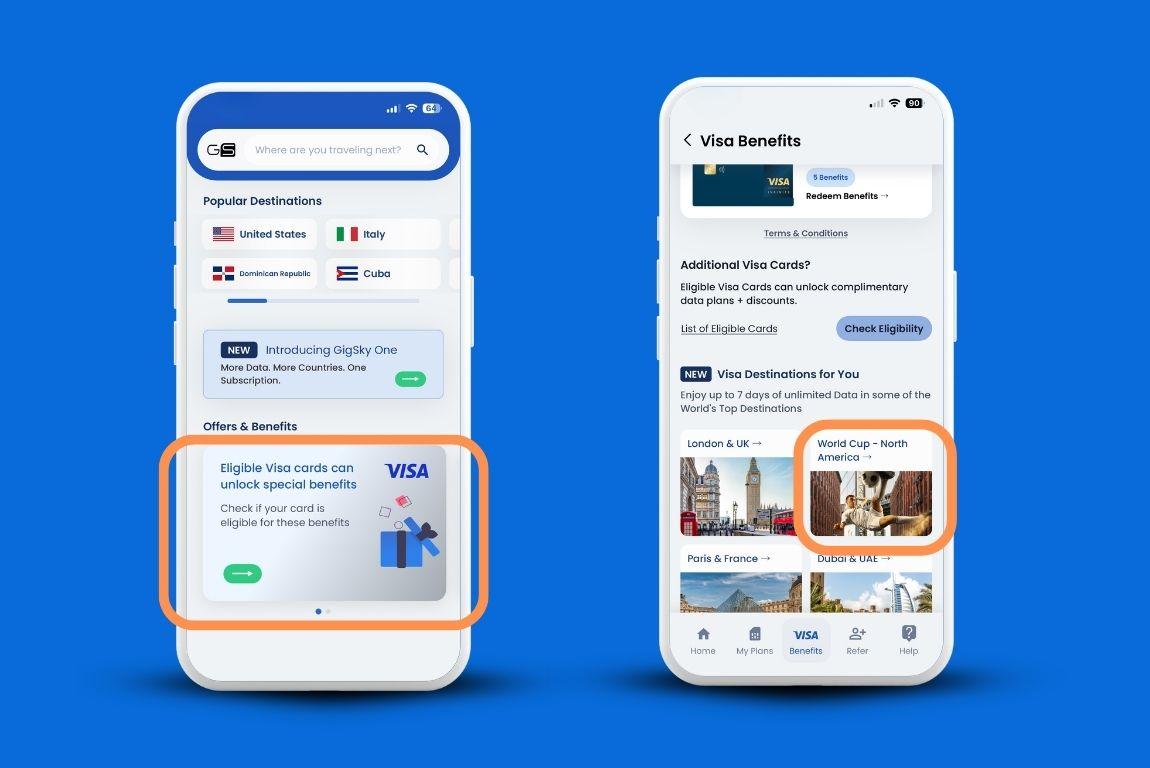
An eSIM is a digital SIM card. There's no physical card to insert or swap. Instead, you download an app, purchase a data plan, and install it directly onto your phone. The whole process takes about five minutes and you can do it from home before your trip.
Step 1: Download the GigSky app
GigSky is a US-based eSIM provider and the app is available on both iOS and Android. Once it's installed, you can browse plans, check Visa benefit eligibility, and manage everything from one place.
Step 2: Check your Visa benefit
[Add video https://vimeo.com/1180854921 ]
From April 1 through July 31, 2026, eligible Visa cardholders traveling to the US, Canada, or Mexico get free data across all three countries as part of a special World Cup benefit. Tap the Visa banner inside the app, enter your card number, and the app will tell you immediately whether your card qualifies.
Visa Infinite cardholders get 7 days of unlimited data plus 30% off any additional plans. All other eligible Visa consumer and commercial cards, including debit and prepaid, get 3 days of unlimited data plus 20% off additional plans. The discount doesn't expire once you're verified.
You don't need to be attending matches to use this. Any eligible Visa cardholder traveling to any of the three host countries during that window can claim it.
Step 3: Choose a paid plan if you need more data
If your Visa benefit doesn't cover your full stay, you can purchase a plan directly through the app.
GigSky operates its own network agreements rather than reselling access through a third party, that matters for coverage quality and pricing flexibility. For travelers specifically looking for a reliable eSIM USA option, it's one of the more straightforward setups available.
Step 4: Install the eSIM
Once you've selected a plan, the app walks you through the installation. The eSIM installs onto your phone digitally. Your home SIM stays in place the whole time.
Step 5: Travel, and connect automatically
You don't need to activate the plan manually when you arrive. When your plane lands and your phone picks up a signal, it connects automatically to the best available network.
That means you have data before you clear passport control. Uber, maps, messages all working before you've even collected your luggage.
GigSky Plan Pricing for the World Cup
If you're traveling to the US only, here's what the USA eSIM plans look like at current pricing:
| Plan | Duration | Price |
|---|---|---|
| 100 MB | 7 Days | $0 (No Card Required) |
| Unlimited eSIM data | 3–7 Days | Free Trial (With an eligible Visa card) |
| 1 GB | 7 Days | $4.99 |
| 3 GB | 15 Days | $10.19 |
| 5 GB | 30 Days | $16.99 |
| 10 GB | 30 Days | $27.19 |
| 50 GB | 90 Days | $73.94 |
| 100 GB | 180 Days | $110.92 |
If your itinerary crosses into Canada or Mexico, the North America unlimited plans are the cleaner option:
| Plan | Duration | Price | Daily Rate |
|---|---|---|---|
| Unlimited | 3–7 days | $0 (with an eligible Visa card) | $0 |
| Unlimited | 1 Day | $5.99 | $5.99/day |
| Unlimited | 3 Days | $15.74 | $5.25/day |
| Unlimited | 5 Days | $22.49 | $4.50/day |
| Unlimited | 7 Days | $29.24 | $4.18/day |
| Unlimited | 14 Days | $45.74 | $3.27/day |
| Unlimited | 21 Days | $56.99 | $2.71/day |
| Unlimited | 30 Days | $68.99 | $2.30/day |
Unlimited data plans provide 3.5 GB of high-speed data per day. After that, speeds reduce but you stay connected.
For most people at the World Cup, using maps, messaging, and social media throughout the day, 3.5 GB is more than enough for a full match day.
If you're staying longer than three weeks and want a subscription model, GigSky One is worth looking at. It covers the US, Canada, and Mexico with monthly plans starting at 25 GB for $17.00 per month.
| GigSky One Plan | Duration | Price |
|---|---|---|
| 25 GB | 1 Month | $17.00 |
| 50 GB | 1 Month | $27.00 |
| 75 GB | 1 Month | $36.99 |
Option 2: How to Get a USA SIM card for the World Cup
A SIM card USA option gives you a local US phone number. That's the main practical reason to get one: if you need to receive text message verification from US-based apps, place food delivery orders, or use services that require a local number, having a real US number simplifies things.
Here's how it works in practice.
Step 1: Find a carrier store or kiosk after landing
The main US carriers selling prepaid SIMs are T-Mobile, AT&T, and Verizon. You can find their stores in most major US cities and at some airports.
Some convenience stores and big-box retailers also stock prepaid SIM cards from these carriers.
Keep in mind: you're arriving tired, likely with luggage, and possibly in an unfamiliar city. In some cases the carrier stores aren't in the terminal itself, which means sorting this out after you've cleared customs and collected your bags.
Some travelers mention getting caught out by this, particularly in cities like Houston and Dallas where the stadium is 30+ miles from the airport and there's limited public transit to sort things on the way.
Step 2: Choose a prepaid plan
T-Mobile, AT&T, and Verizon all offer prepaid options. Prices vary but here's a general idea of what's available:
| Carrier | Plan | Duration | Approx. Price (USD, before tax) |
|---|---|---|---|
| T-Mobile | Starter / Connect (15GB) | 30 days | $40–45 (often $45 first month) |
| T-Mobile | Unlimited (50GB premium) | 30 days | $50 (first month ~$55) |
| T-Mobile | Unlimited Plus | 30 days | $60–65 |
| AT&T | Unlimited Basic / 30GB | 30 days | $25–35 |
| AT&T | Unlimited + Hotspot | 30 days / 12 mo | $35–50 (or $20/mo prepaid yearly) |
| Verizon | 15GB Plan | 30 days | $35–45 (first month higher) |
| Verizon | Unlimited | 30 days | $50–60 |
| Verizon | Unlimited Plus | 30 days | $60–70 |
Prices are approximate and may include taxes and fees at checkout. Some plans require a US address or ID to purchase.
Step 3: Insert the SIM and set up manually
To use a physical SIM card USA, you'll need to remove your home SIM card from your phone and store it safely for the duration of the trip.
If you lose it, getting a replacement from your home carrier while abroad takes time.
After inserting the new SIM, you'll typically need to restart your phone and manually configure the APN settings.
What a physical SIM doesn't cover
US carrier prepaid SIMs are designed for use within the US. If your World Cup plans include games in Canada or Mexico, you'll be in a different country with a SIM that wasn't set up for it.
You'd either need to purchase a separate local SIM in each country or rely on international roaming at an additional cost.
How Much Data Do You Need?
This depends on how you use your phone day to day. If you're mostly on WhatsApp, checking a few emails, scrolling social media, and posting occasionally, you're likely using somewhere between 300 and 500 MB per day.
That puts a two-week stay comfortably within a 7 GB–10 GB plan.
If you're using Google Maps continuously between venues, streaming highlight clips at the stadium, or video calling home after matches, your usage climbs.
For those trips, an unlimited plan or GigSky One makes more sense than trying to ration a fixed data allowance across a long itinerary.
One thing to factor in: stadium crowds are dense. Tens of thousands of people on their phones at the same time will strain any network. Having a plan with enough headroom means you're not watching a loading screen when you want to post that goal.
A Note on Voice Calls
GigSky's eSIM is data-only, so there's no traditional phone number attached to it. For most World Cup travelers, that's not a problem. WhatsApp and FaceTime work over data. You can call anyone who's on a smartphone.
If you specifically need a USA SIM card for call verification, food delivery confirmations, for example, a few alternatives exist.
Some apps now accept email verification instead of a phone number. Others can use your home number. It's worth checking the specific apps you rely on before you arrive.
When Should You Set This Up?
Set up your eSIM one day or the same day of your flight while you still have good connectivity.
Download the GigSky app and check your Visa eligibility now, before your trip is closer and the details are competing for your attention with everything else.
The verification process takes a few minutes and once it's done, your benefit is ready whenever you need it.
Install the eSIM plan before you board. When you land in the US, Canada, or Mexico, your phone connects automatically.
You'll have data before you reach passport control, which means Uber, maps, and messages are working from the moment you step off the plane.
Recap: Getting a USA eSIM or SIM Card for the World Cup 2026
- Check eSIM compatibility first: dial *#06# on your phone or check Settings, General, About for your EID number.
- Confirm your phone is unlocked: Settings, General, About, Carrier Lock should say "No SIM Restrictions."
- If you have an eligible Visa card, open the GigSky app, tap the Visa banner, and check whether you qualify for free data across the US, Canada, and Mexico. Visa Infinite cards get 7 days of unlimited data. All other eligible Visa cards get 3 days.
- The Visa benefit runs from April 1 through July 31, 2026, and covers all three World Cup host countries under one plan.
- Whether you're looking for a USA eSIM or comparing physical SIM options, GigSky's eSIM installs once, reconnects automatically every trip, and works across 200+ countries. No QR codes, no manual activation on arrival.
- GigSky is data-only. Voice calls work through WhatsApp and FaceTime over data.
- Unlimited plans provide 3.5 GB of high-speed data per day. After that, speeds reduce but connectivity stays active.
- For stays longer than three weeks, GigSky One starts at $17.00 per month for 25 GB across North America.
If you need an eSIM USA that works the moment your plane touches down, no store visits, no SIM swapping, GigSky is worth setting up before you fly.