

%2520-%25202026-06-30T184503.164.jpg&w=3840&q=75)


Should I Set Up My eSIM for Japan Before the Trip? A Pre-Trip Checklist
Set up your eSIM for Japan before you fly. Discover the simple checklist that helps you land connected, avoid mistakes, and travel stress-free.
 by Amira Bula
Set up your eSIM for Japan before you leave home, not at the airport and not after you land.
With GigSky you install the eSIM once in the app while you are on strong Wi-Fi, and it automatically connects to the best local network the moment your plane touches down in Japan.
That timing matters more than most travelers expect. This checklist walks you through when to buy, what to check on your phone, and how to land already connected.
Get your Japan wireless eSIM with GigSky
Your Japan Wireless eSIM Pre-Trip Checklist at a Glance
Here is the short version. Each row links to a step you can finish before you pack.
| Step | What to do |
|---|---|
| Check your phone | Confirm it's unlocked and eSIM compatible. |
| Pick your plan | Choose a Japan plan, or an Asia regional plan if you are visiting more countries. |
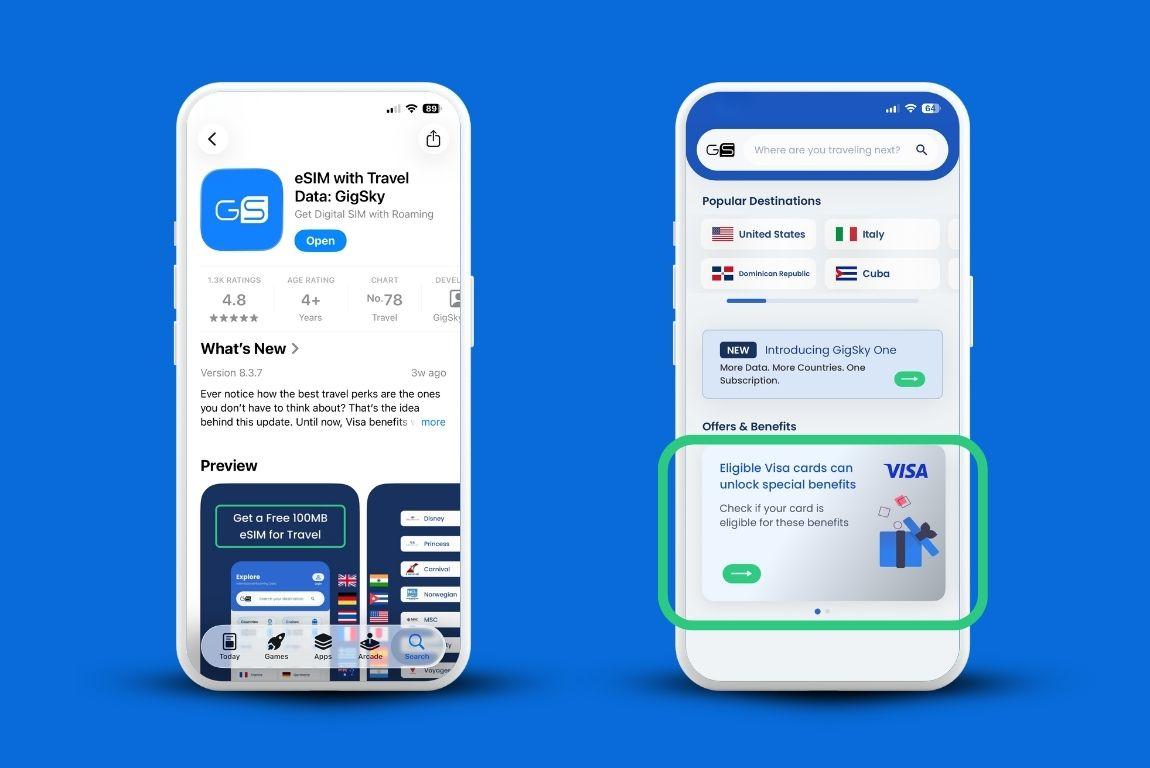
| Check free data | See if you qualify for 100 MB free, or up to 5 GB free with an eligible Visa card. |
| Install at home | Install the eSIM on strong Wi-Fi a day before departure. |
| Land connected | Arrive in Japan with data already working, no setup needed. |
Set up your GigSky eSIM for Japan
When Should I Set Up My Japan eSIM?
Set up your eSIM card Japan plan before you leave your home country, ideally a day or two before departure or the same day, while you still have strong connectivity at home.
A weak or busy connection at the airport can interrupt the install, and an eSIM that only half-installs is the kind of problem you do not want to be sorting out in a terminal or after you land.
There is a second reason to do it early.
With GigSky, installing the eSIM before you fly means you arrive in Japan already connected.
You don’t open the app, scan anything, or change a setting on arrival. The phone finds a Japanese network and your data starts on its own.
Does the Validity Clock Start When I Buy or When I Land?
With GigSky, the validity clock starts when you install the eSIM, not when you buy it. Other providers vary.
Many Japan eSIMs only start counting once your phone first connects to a network in Japan, so it is worth checking the rule for whichever provider you choose before you install.
Will Activating Early in the US Waste My Plan?
If you buy a Japan plan while you are still home, it will not connect to a US network and it will not burn through your days.
A Japan wireless eSIM only starts pulling data once your phone finds a Japanese network. So the moment you arrive, it begins using your plan, not a second before.
Is My Phone Ready for an eSIM for Japan?
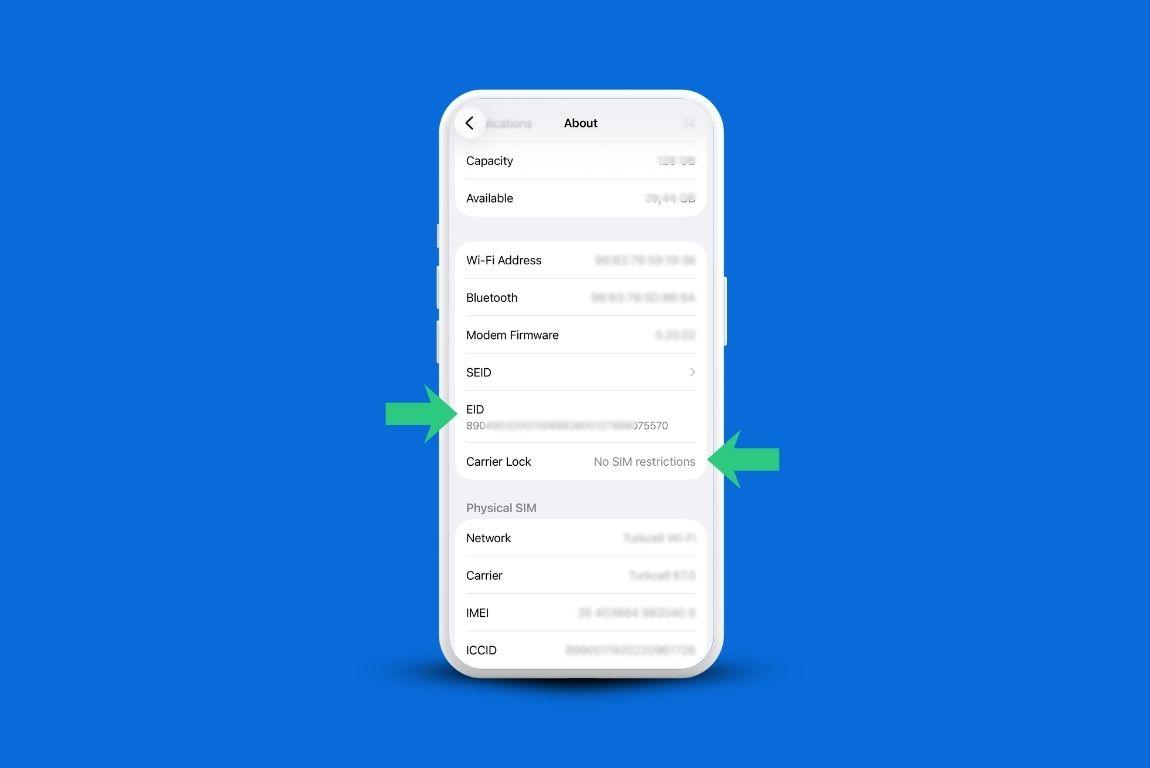
Your phone needs to be both unlocked and eSIM compatible to use any Japan eSIM. Two quick checks settle it before you buy anything.
Check whether your phone is unlocked with this fast guide, and confirm eSIM support on the device compatibility page. If your phone passes both, you are set.
If it does not support eSIMs, a physical SIM is your fallback. If it is locked, a pocket Wi-Fi device is the workaround.
What Should I Do With My Home Carrier's SIM?
Leave your physical SIM in the phone, then turn off its mobile data.
Go to your phone settings, open Cellular, find the line showing your home phone number, and switch its data off.
That keeps you from racking up roaming on your home line while your GigSky data handles the trip.
Which Japan Plan and How Much Data Do I Need?
Pick a Japan-only plan if Japan is your single stop. Choose GigSky's Asia regional plan, which covers 19 Asian countries, if you are continuing on to other places in the region.
In Japan, GigSky connects to NTT Docomo and Softbank, so you get 5G and 4G coverage.
For data, a rough guide for a one-week trip with maps, translation, social apps, and the odd video call is around 3.5GB if you are a light user, and 7GB or more if you lean on your phone heavily.
For two weeks, plan on about 7.5GB as a light user, and 14GB or more as a heavy one. If you want to size it properly, GigSky has a full guide to estimating how much data you need.
Are Unlimited Plans Really Unlimited?
Most unlimited eSIM plans, GigSky included, carry a throttling policy. The difference is transparency.
GigSky tells you the number up front: you get 3.5GB of high-speed data every 24 hours, and if you pass that, your speed slows for the rest of the day while your data keeps flowing.
Most travelers never cross 3.5GB in a single day, so this rarely bites. Some providers do not publish their throttling threshold at all, which leaves you guessing about when your speed might drop.
Can I Get Free Data in Japan First?
Yes, and trying it before you pay is a smart move when you are using a new provider. GigSky offers two ways to get free data in Japan, and neither one charges you to check.
Without a card, you can get 100MB free for Japan. It is not a lot, but it is enough to confirm your eSIM for Japan travel installs and connects properly before you commit to a paid plan.
With an eligible Visa card from the Americas, you can unlock up to 5GB free for Japan, the most generous free data on offer. Verifying your card does not charge you anything. It only checks whether you qualify.
How Do I Install my eSIM for Japan Travel?
Follow these steps before your trip. The whole thing takes a few minutes on Wi-Fi at home.
- Download the GigSky app.
- Search Japan, or search Asia if you are visiting more countries, to see the available plans.
- If you have an eligible Visa card, scroll down to Offers and tap the Visa banner.
- Add your card to check eligibility. This does not charge you anything.
- Choose your plan and set up your eSIM for Japan travel while connected to strong Wi-Fi.
Want to see it done? Watch the full setup video here. The two mistakes that trip people up are skipping the pre-trip install and not checking whether they have free data available first.
How Reliable Is Coverage Outside the Cities?
Coverage holds up well beyond the cities with GigSky because GigSky is a mobile operator, not a reseller. It partners directly with local networks, so your phone connects to the strongest available signal, including in more remote areas, on trains, and in the mountains.
Do I Need a Backup SIM or Pocket Wi-Fi?
For most travelers, no. A pocket Wi-Fi adds cost and a second device to carry and charge, and a backup physical SIM is rarely worth it.
Buy a physical SIM only if your phone does not support eSIMs, and consider pocket Wi-Fi only if your phone is locked or not eSIM compatible.
What If the eSIM Card Japan Doesn't Work When I Land?
Restart your phone first. A reboot clears up most arrival hiccups. If it still doesn’t connect, GigSky has a step-by-step troubleshooting guide you can follow here.
Japan wireless eSIM FAQ
Can I activate the eSIM in the US and have it connect automatically when I land?
Yes. Buy and install your GigSky eSIM at home, and it connects on its own when your plane lands in Japan. There is nothing to switch on at the gate.
Are there Japan-specific requirements like a passport or local address?
No. To use a GigSky eSIM for Japan you only need to download the app and install your plan. No passport details or local address required.
Will the eSIM affect iMessage, WhatsApp, or two-factor codes tied to my number?
Your apps keep working, with one limitation worth knowing. A GigSky eSIM is data only, so you can make calls through WhatsApp and FaceTime, but you cannot make regular phone-number calls or receive SMS text messages on it. If a service sends two-factor codes by SMS, set up an alternative before you travel.
How does an eSIM compare to my carrier's international roaming?
Roaming is simple to switch on, but the cost varies a lot by carrier and destination, so compare your carrier's Japan rate against an eSIM plan before you decide. Many experienced travelers also find connectivity stronger on an eSIM than on roaming.
Download the GigSky app and set up your Japan eSIM
Recap: Setting Up Your Japan eSIM
- Install your eSIM at home on strong Wi-Fi, a day or two before you fly, not at the airport.
- With GigSky the validity clock starts at install, and you land in Japan already connected.
- Check that your phone is unlocked and eSIM compatible, then turn off data on your home SIM.
- Plan roughly 3.5GB per week as a light user, more if you rely on your phone.
- Try free data first: 100MB without a card, or up to 5GB free with an eligible Visa from the Americas.